6.10. Debugging an LN Service Provider written in C++
6.10.1. For whom this is written
This chapter explains how to debug an LN service provider program written in C++. As intended audience, it is aimed at C++ programmers with a little experience, which are not familiar with debugging and know only the basics of LN, and which might have a unstable program that produces errors in some situations.
Because our goal is to provide a comprehensive, coherent, gap-free introduction, the only assumption made here is that the reader has a working knowledge how to write and run programs written in C++11.
We will explain with an example that is very similar to the C++ example for a service provider explained in the C++ Tutorial chapter, also using the section Using Service Wrappers from C++ (so if you have questions about how the LN functions work in general, have a look there!).
6.10.2. Overview
We will start by showing how to compile a program with debug information, and how to extract crash dump information (so-called core dumps) from OS services.
Example
Based on that, we will start with a practical example, a simple program that has some truly insidious problems, with a mounting list of user complaints.
Technicals
We will then first show both the basics of how to start a debugging session, and how to debug a program running under the LN manager. This will be done by using the most fundamental tool, the GNU GDB [1]. (This is not a limitation, as GDB is very powerful, and any learning from this is easily transferable to other tools and IDEs).
An efficient and well-proven Debugging Methodology
Apart from explaining the fundamental debugger commands, we will also show, by example, a battle-proven methodology which will, in combination with some important programming best practices [2], help to quickly uncover the true source of errors. We will iterate those for a number of steps to correct the program, alongside with making the reader familiar with the method.
More powerful Tools making Programs bug-free
After this, we will add explanations of a few more well-known and powerful methods. As we will demonstrate, they do not only make it much faster to find errors, but make it also possible to produce programs with much fewer errors:
Using the full power of compiler warnings
Using the compiler’s undefined behavior sanitizer and address sanitizer.
Using unit tests.
Finally, we will go through every single error in the buggy program and show you step by step where the error is hidden, and how to correct it. At the end of these steps, we will have a correct program.
Footnotes
6.10.3. Obtaining and Using Debug Information
6.10.3.1. Compiler Flags
Before we start with demonstrating and explaining a debugging session, we provide a few notes on how to obtain useful information.
If we want to debug programs, the first step is to instruct the
compiler to add debug information to the executable. For the compiler
that we use in our examples, the GNU GCC, this is done with the
"-g" flag.
Further, it is almost always helpful to disable optimization,
because optimization will often omit individual program steps and move
instructions, making the execution of the code harder to understand.
Optimization can also worsen the effect that bugs which are not
logical but affect the run-time environment, triggering so-called
undefined behavior, will pop up in seemingly unrelated places.
So, the second compiler flag we want to set is "-O0", disabling
optimization.
6.10.3.2. Core Dumps
Core dumps are files that the operating system creates when a process crashes with certain errors or signals, such as a segmentation violation, indicating an illegal memory access. They contain the entire process state at that moment, including the content of all variables, stack, and CPU registers. Therefore, they can be very helpful to determine the cause of a crash, especially of code that already is running in production.
In older or traditional embedded systems, the kernel
often stores the core dump in the working directory
of a crashed process, saving it to the file name
core. Whether a file which exceeds a certain
size will be created, can also be influenced for example
with the ulimits shell command of the bash shell.
On modern Linux systems, core dump files can be accessed via systemd’s coredumpctl command. To locate the point of a crash, simply run gdb with the core file as an argument:
gdb core-file <corefile>
6.10.4. Debugging LN clients
Now, we will show how to debug an LN client, with a system that has a structure similar but a bit simpler to the one shown in the C++ Tutorial tutorial example, consisting of a simple LN service client and a service provider, both written in C++.
6.10.4.1. Our Problem: Dubious Math
The service provider offers, as a computational service, the computation of prime factors, using the “Sieve of Eratosthenes” Algorithm (see https://en.wikipedia.org/wiki/Sieve_of_Eratosthenes for a description of the algorithm).
It offers three service calls which should do three things:
Accepting a number, compute and return the prime factors of that number, where factors that occur multiple times are listed multiple times.
Accepting a number, compute and return the largest prime factor of that number.
Accepting a list of numbers that is terminated with the number zero, compute a list of the common prime factors of these numbers, each factor being listed only once.
For the example, we have stored a list of the program’s requirements
into the file examples/debugging/example_cpp_number_factoring/REQUIREMENTS.md,
and a list of complaints around malfunctions into
examples/debugging/example_cpp_number_factoring/COMPLAINTS.txt.
6.10.4.1.1. We have a few Bug Reports: A List of Complaints
Here the list of complaints:
There are some complaints about bugs.

Specifically, on the factorizing :term:`module`, customers have the following
complaints:


1) Using option (a), if one enters a negative number, the program crashes.

2) Using option (a), If one enters the number 59, strangely the factorization
   has only the result 1, which can't be correct.

3) If one uses option (c) to find common prime factors with the number
   600 and 60, the software returns the numbers 2, 3, 5 and 5 which is
   not correct: As per requirement number 3.1, each number must
   only occur once.

4) If one uses option (b) to get only the largest prime factor of
   a number, the program crashes.

5) Using option (c), if one uses the debug option for option (c) to
   print some intermediate results, the program crashes

6) Using option (a), If one enters the value 426409, the factorization
   has no result except 1.

P.S.

Some customers have expressed concern about code quality, citing
"too many crashes". Would it be possible to add some unit
tests to make the code more robust?
If you look at the code of the service provider implementation, which
is present in the file
examples/debugging/example_cpp_number_factoring/factors-provider.cpp,
you might see that not all of these bugs are obvious. So,
we will use this buggy program as our example.
Core Algorithm, finding Prime Numbers
Here a short overview on the algorithm and implementation: For each of
th three service calls from our list above, there is a call handler. The
computation is forwarded to a few functions. First, all calls compute one or
more lists of prime factors, by calling the function
compute_primes(). It takes an integer argument n, which is the
number that should be factorized, and returns a list of primes up to
that number. To compute these primes, it uses the famous “Sieve of
Eratosthenes” algorithm. First, it does some range checking and throws
an exception if the number is negative, or too large. This algorithm
is split into four parts:
An array of Boolean flags is initialized, with all flags being set to
true. The length of the array is the maximum number, which isn. At that point, the meaning of the flags is that for an entry with that index, so far no divisor larger than 1 was found.Then, the algorithm iterates all entries starting from index 2, up to
n. If the entry’s flag is found tobetrue, it has found a prime, and it marks all multiples of that number as false, until the end of the array is reached.That iteration ends when the square of the index that is processed becomes larger than
n, because all smaller multiples of primes will have been marked at that point.Finally, all entries which still have the flag set to
trueare returned in a list.
Once the list of prime number has been computed, it is used for each corresponding service call. The following algorithms each have some very obvious possible optimizations. We skipped these because we have the goal to keep the code as dumb and easy-to-understand as possible, so that we can focus on smart debugging methods.
Service call 1: Finding and counting Prime Factors
In the function compute_prime_factors(), the number in the request
argument is taken and it is tried to divide it by each prime factor,
starting from 2 and going to the largest factor in the list. If the
division has no remainder, a count for that prime factor is increased,
and the attempt is re-tried with the quotient as new value to be
divided. If there is a remainder, the next-largest prime is tried,
until the remaining quotient is 1. This is essentially what is
performed for the first service call, which computes a list of prime
factors by calling compute_prime_factors().
Service call 2: Getting the largest Prime Factor
The service call to compute the only largest prime factor is
implemented in the handler on_get_largest_prime_factor(). It also
calls compute_prime_factors(), and also passes a flag that
reverses the resulting list (using the function reverse_list()),
so that the largest factor is first in the result list; then, it
simply picks the first element.
Service call 3: Getting common Prime Factors for a List of Numbers
The service call to get all common factors is implemented in the
handler on_get_common_factors(). It first creates a list of lists
of prime factors, one list for each input number, by calling the
function get_all_factors(); this function takes a list of the
input numbers, and returns the list of lists of prime factors. In this
list of lists, multiple identical factors in one and the same list are
removed by calling the function remove_multiple(). Then, the
handler calls the function get_common_factors() with that
list. This function computes a successive set intersection for each
list, starting with the first list as the base set, and reducing it
iteratively to a set which only has members that belong to both
sets. When finished, it returns the result.
At that point, you are really invited to have a good long look at the
complaints, the code in
documentation/examples/debugging/example_cpp_number_factoring/factors-provider.cpp
and the detail algorithm explained, for example, in the above
mentioned Wikipedia article, and try to figure out some of the
bugs. This effort will help you a lot to understand the explanation
that comes next.
6.10.4.2. How to start a Process with Gdb
6.10.4.2.1. Adding Debug Flags to the Compilation via “make”
First, we need to add the debug flags to the building of our executable, as explained above.
If you inspect the source folder examples/debugging/example_cpp_number_factoring/,
you will see that it is built with a standard Makefile,
that uses the CXXFLAGS environment variable.
This provides us with an easy way to add debug information to the build: We just need to prepend the debug flags “-g -O0” to the “make” command and build a new version of the program, like so:
make clean
CXXFLAGS="-g -O0 $CXXFLAGS" make
The result will be a new set of binaries with debug information that we can run in-place, and that will point to the source code files from which they were built.
6.10.4.2.2. Starting the Process which needs Debugging in the LN Manager
Now, we can start the LN manager with the usual command line:
ln_manager -c factors.lnc
In the LN manager GUI, one can select first the “factors-provider” process, and then in the right panel, in the “start with” drop-down menu, the option “gdb”, as shown in the following screenshot:
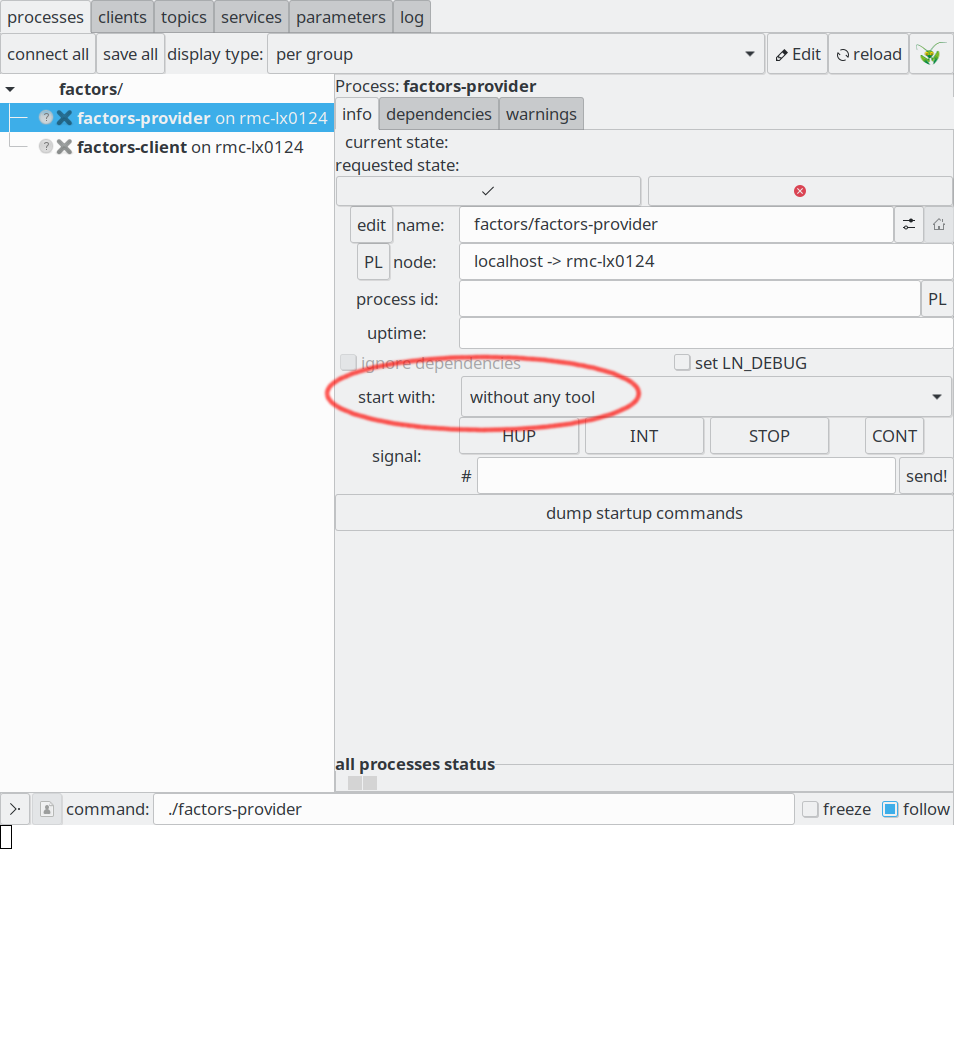
The “start with” drop-down menu in the LN manager.
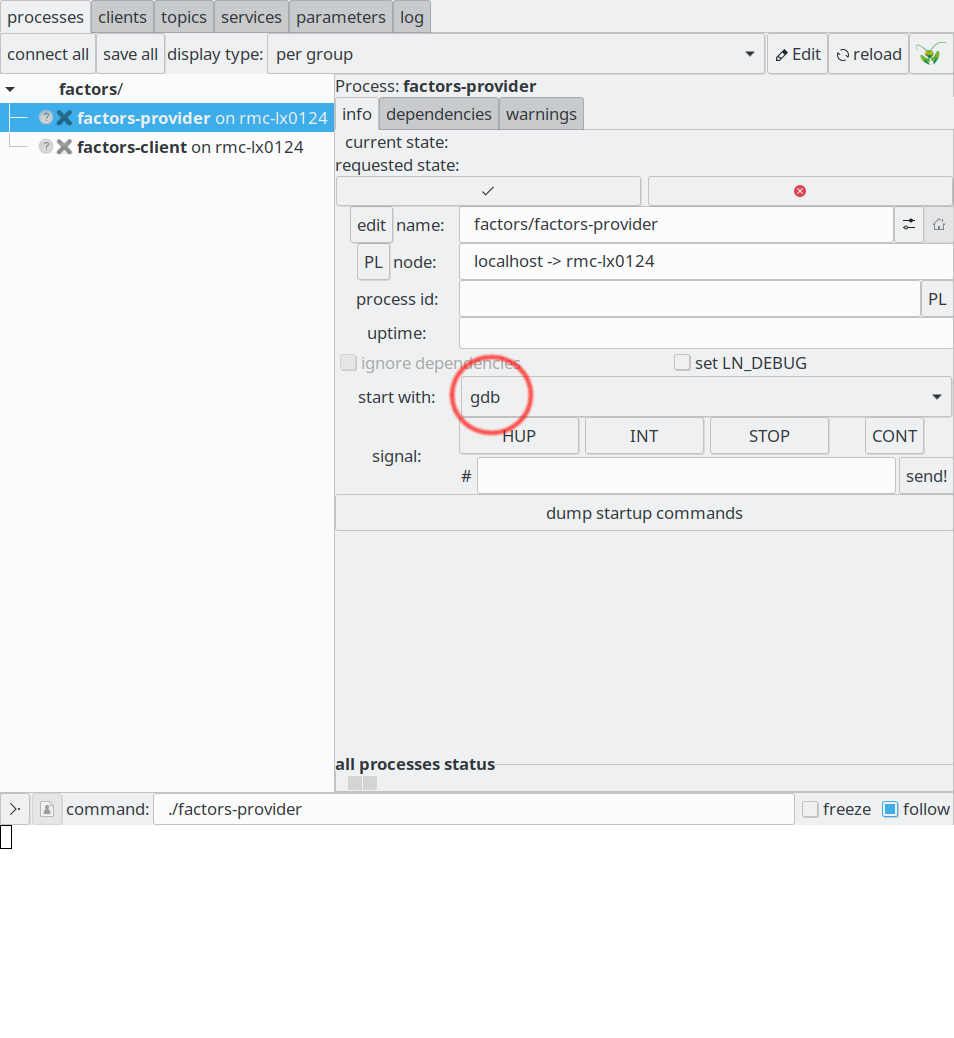
Starting a process with the gdb, using the “start with” drop down menu
Now, both processes - service provider, and service client - can be started.
There is another really useful GUI facility which we will use now: We can create a stand-alone clone of the service provider’s output terminal, by clicking the symbol that looks like a “Y” turned 90 degrees anti-clockwise, like here:
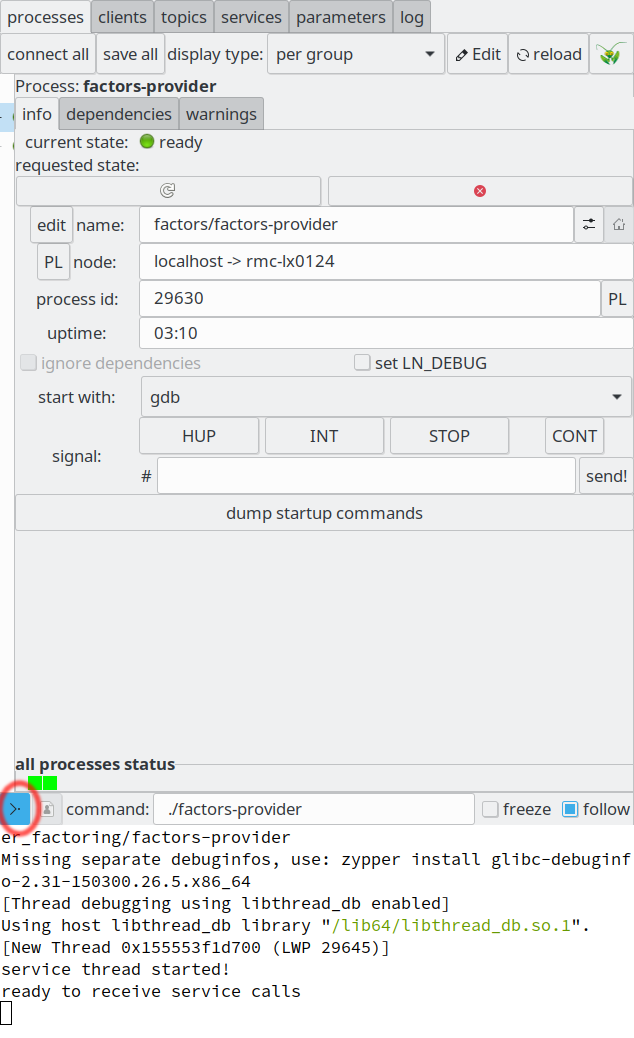
Starting a process with the gdb
And with this, the output of the process runs in an own terminal, like this:
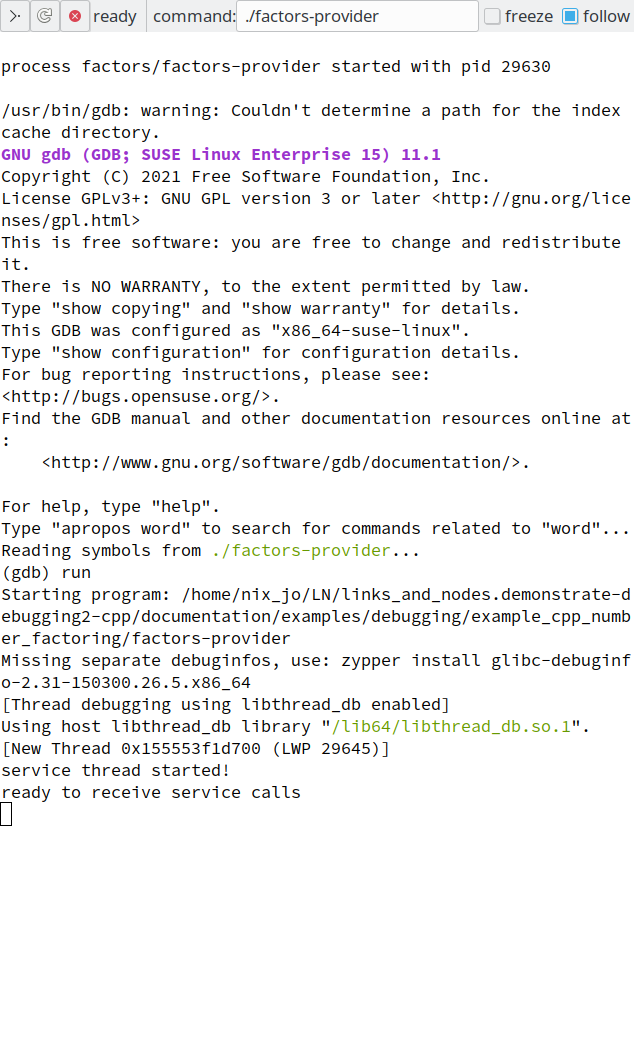
Starting a process with the gdb
In the following, we will not use screenshots but just replicate the
text in that terminal, with the gdb prompt "(gdb)" in front of
what you type in, followed by the response. In the above example, we
typed the command “run”, which is responded by the standard output of
the service provicer process (to send an interrupt to the program that
is being debugged, one would need to use GDBs “signal” command).
One thing that we have to note is, that in current versions of LN (up to 2.1.x), there is an asymmetry in respect to the state of the GDB debugger after starting a process, depending on how it was started:
If it is directly started, like shown here, the process is already running under the GDB. This behavior is altered if the mouse click to the start button is done while the
<shift>key is pressed; in this case, the debugger waits, so that we can set breakpoints first.If the process was started as a required dependency of another process, the GDB will have been started, but it will wait at its prompt. In that case, we need to type the “run” command (followed by the enter key), in order to actually start the process.
In any case, pressing Control-C will bring us back to the GDB prompt, and typing “continue” will continue the execution of the process.
6.10.4.3. Gdb: Fundamental Commands
Using the GDB from the command line, we can control the process and also inspect quite a number of things. Here is the list with the basic commands - we will shortly show how to use them:
runwill run or, if it was already running, re-start the processcontwill continue to run a process that was just haltedb(reak) FUNCwill set a breakpoint at function FUNC. At such a breakpoint, the running process will be stopped, and the debugger will wait for further instructions. If we are debugging C++, we can use C++ names spaces in double-colon notation to identify methods of classes.b FILE:LINEwill set a breakpoint at that line with in that file.info bwill list breakpoints by numberdelete #will delete a breakpoint, identified by its numberbt (backtrace)will show the stack trace of a processp(rint) VAR|EXPRwill print the value of a variable or expression. It can also be used to print the content of containers, such asstd::vector<>.info bwill give information on breakpointsinfo threadswill give information on running threadsthread TNRwill switch the focus of the debugger to the thread with that numbersignal 2will send signal number 2 to the process being debugged, which allows us to simulate an interrupt key press
Each command can be abbreviated to a few letters or a single letter,
as long as it does not become ambiguous. This way, typing "b" has
the same effect as typing "break".
Some commands depend on context, for example if you use “info b”, you get a numbered list of breakpoints, and you can use the numbers that you got to clear one of them.
6.10.4.4. Debugging the program step-by-step
Now, let’s go on to debug the program step by step.
Let’s look at the first complaint:
"1) Using option (a), if one enters a negative number, the program crashes."
So, we just need to make sure that the service provider process is running (if necessary, by typing the “run” command into the debugger terminal). This is what we see in the debugger window:
Picking up on the start-up process described above, the debugger terminal shows this:
[New Thread 0x155553f1d700 (LWP 31277)]
service thread started!
ready to receive service calls
Then, we go to the service client terminal window (which runs inside the LN manager, and becomes visible if you click the client process in the process view). It shows a text prompt like this:
process factors/factors-client started with pid 29649

type (a) for prime factors, (b) for largest factor,  (c) for common factors
$
and we type a, followed by “enter”, followed by the number “-1”, followed by “enter”.
Now, the debugger window shows this, indicating the crash:
[0] prime found: 1

Thread 1 "factors-provide" received signal SIGSEGV, Segmentation fault.
0x0000000000403a35 in std::_Bit_reference::operator bool (this=0x7fffffffe370) at /usr/include/c++/7/bits/stl_bvector.h:81
81      { return !!(*_M_p & _M_mask); }
Missing separate debuginfos, use: zypper install libgcc_s1-debuginfo-11.2.1+git610-150000.1.6.6.x86_64 libstdc++6-debuginfo-11.2.1+git610-150000.1.6.6.x86_64
As we see, the OS reported a segmentation fault, which is caught when the kernel notes that a program writes to a forbidden or non-existent memory address. We can look at the backtrace, to see where the fault happened:
(gdb) bt
#0  0x0000000000403a35 in std::_Bit_reference::operator bool (
    this=0x7fffffffe370) at /usr/include/c++/7/bits/stl_bvector.h:81
#1  0x00000000004030de in compute_primes (n=-1) at factors-provider.cpp:59
#2  0x00000000004033c5 in compute_prime_factors (n=-1, reverse_order=false)
    at factors-provider.cpp:92
#3  0x0000000000406875 in FactorizerServer::on_get_prime_factors (
    this=0x7fffffffe760, req=..., data=...) at factors-provider.cpp:214
#4  0x0000000000405852 in factorizer::request::get_prime_factors_base::cb (
    req=..., user_data=0x7fffffffe760) at ln_messages.h:50
#5  0x0000000000402cbf in ln::_service_handler (req=0x627d50,
    user_data=0x628a70)
    at /volume/conan_cache/nix_jo/.conan/data/links_and_nodes_python/2.0.4/common/stable/package/887fcbce9c5039c599196293a85f5343dcb81c50/include/ln/cppwrapper_impl.h:843
#6  0x00001555550dae2c in _ln_service_client_handle_request (
    c=c@entry=0x627d50) at libln/src/service.c:2793
#7  0x00001555550db0a0 in __ln_service_client_handle_event (
    thread=<optimized out>, data=0x627d50) at libln/src/service.c:2486
#8  0x00001555550db124 in _ln_service_client_handle_event (sg=<optimized out>,
    c=0x627d50) at libln/src/service.c:2509
#9  0x00001555550db25b in _ln_handle_service_group_requests (
    sg=sg@entry=0x6286f0) at libln/src/service.c:2558
#10 0x00001555550db465 in ln_wait_and_handle_service_group_requests (
--Type <RET> for more, q to quit, c to continue without paging--
What does this tell us? It shows us the call stack with each function
call, and the position in the source file; the highest-numbered stack
frames are the ones on top, and the number 0 is at the bottom of the
stack. Now, the stack frames number #10 to #4 are from the LN
framework; we assume that the error is not there. In the same way,
stack frame #0, where the crash happened, is in the code of the
system-provided STL library, which is not likely to have blatant
bugs. However, the last stack frame before is in file
factors-provider.cpp in the function compute_primes(), and we
also see that the argument to that function was the number -1, which
is equal to what we typed as input.
Now, we can go up one stack frame, and list the source code lines at that place, to gain more orientation, typing “q” to quit the listing of the stack trace, “up” to go up one stack frame, and “l” to list the source code at that point. We see:
  --Type <RET> for more, q to quit, c to continue without paging--q
Quit
(gdb) up
#1  0x00000000004030de in compute_primes (n=-1) at factors-provider.cpp:59
59                  if (is_marked_prime[p]) {
(gdb) l
54                  }
55                  p++;
56          }
57          // error: it must be p <= n
58          for(p = ((int) max_factor) + 1; p < n; p++) {
59                  if (is_marked_prime[p]) {
60                          result.push_back(p);
61                          cout << "[2] prime found: " << p << '\n';
62                  }
63          }
(gdb)
So, the error happened in line 59, when the value of the
Boolean array (std::vector<bool>) is_marked_prime[]
was queried. We can now also query the value of the variable p,
which likely caused the bug:
(gdb) print p
$1 = -2147483647
(gdb)
Ugh, that is somehow… not right. As a precondition, an index to an STL vector should never be negative. What happened?
6.10.4.5. How to nail Bugs quickly
There are now various ways how one could try to isolate and identify that bug. One approach would be to go through the whole program step-by-step, and try to spot the point where things start to go wrong. This has several disadvantages: First, it is very time-consuming. Second, it does not take any advantage of the structure of our code, which, as all well-written code will, has invariants (such as pre-conditions and post-conditions), and interfaces. For example, the fact that an index to an STL vector must never be smaller than zero is such an invariant - STL functions require this as a pre-condition. And thirdly, by ignoring that structure, we are more likely to end up with fixes which do not get to the root of the problem, and even mess our code up, by not taking the invariants and interfaces into account.
Therefore, what we suggest is another approach, which is both very simple but also very powerful:
Based on the code and further information that we have so far, we form some hypothesis on what is happening. This hypothesis has to be a clear statement which is either true or not true.
Then, we use the debugger to check whether our hypothesis is correct. This is an observation.
We add the information whether what we believed was correct to our existing knowledge about the problem, and start again with step 1, until we have thoroughly solved the problem.
You might have noted that the procedure above has a striking resemblance with the scientific method. This is because the problems addressed are very similar: In science, one tries to find a correct model which describes things in the natural world, and this is done by developing hypotheses and testing them against observation.
In the case of the faulty computer code, there is also at the one hand side a kind of model of what the computer should be doing, which is related to the code of the program, but actually resides in the programmer’s mind, and on the other hand that what the computer actually does, and these two things deviate from each other, in unexpected ways. So what we have to do is to find the cause of the deviation, and for this we can apply the very powerful tool of hypothesis-testing.
So, in a nutshell, we first make up a hypothesis about what the program is actually doing, and then we check that, und use the result to refine our hypothesis, again and again - until we get to the core misunderstanding or error.
6.10.4.6. Correcting our Program
6.10.4.6.1. Complaint 1: A Range Check gone wrong
Now, if we look at the problem in complaint number 1,
we know that the input is -1. Also, we can look
at the interface description of the function
compute_primes(). It takes the number which
the factors should be computed from, and in
the general case should return a std::vector<uint32_t>
if the factors. However, the requirements say:
1.1 If a number is too large to compute a result within a few
seconds time, an error code and message should be returned.
and the description of our function says:
// compute list of primes up to a specified number, using
// Euclid's sieve algorithm
// The resulting primes are sorted beginning from
// the smallest to the largest
// If the number is smaller than min_argument,
// or larger than max_argument, an exception
// should be thrown.
So, this is obviously not what happens. If we look at the code, there is in fact a range check, which at first sight looks perfectly good:
std::vector<uint64_t> compute_primes(int64_t n)
 {
     if(n < min_argument)
             throw FactorizerArgumentTooSmallError("you gave: "s + std::to_string(n));
     if(n > max_argument)
             throw FactorizerArgumentTooLargeError("you gave: "s + std::to_string(n));

  // ...
}
In short, calling the function with the argument of -1 should result in an exception being thrown, but the execution arrives at line 59 with:
59 if (is_marked_prime[p]) {
and this fails.
OK, let’s make an hypothesis (1): We assume that the execution is all running correctly until the range check shown above, but that the check for some reason fails.
To test that, we return to the debugger prompt, and set one break point at the start of the function:
b compute_primes
and we restart the program:
run
Then, we enter again the option a and -1 into the UI input prompt. In the debugger, we get:
service thread started!
ready to receive service calls

Thread 1 "factors-provide" hit Breakpoint 1, compute_primes (n=-1) at factors-provider.cpp:34
34           if(n < min_argument)
Missing separate debuginfos, use: zypper install libgcc_s1-debuginfo-11.2.1+git610-150000.1.6.6.x86_64 libstdc++6-debuginfo-11.2.1+git610-150000.1.6.6.x86_64
And now we can inspect the value of the variable n, and min_argument:
(gdb) print n
$1 = -1
(gdb) print min_argument
$2 = 1
Thi slooks good. Then we continue execution by doing just one execution step, using the “step” command:
(gdb) step
and the debuggers response is:
36 if(n > max_argument)
wait a moment… no exception was thrown!
Hypothesis (1) was true: Our check does not work. We can write that down.
So, we have arrived at a point where our model of what the program does (it should throw an exception) and of what it actually does (it does not throw) is obviously different.
Why does the “larger-than” comparison “n > max_argument” fail? If
we look at the definitions of n and max_argument, and consult the
C/C++ standards, we see that n is of type int64_t, while
max_argument is of type uint64_t, which is the corresponding
unsigned type. Type promotion rules in C and C++ dictate that, the
type of n becomes promoted to an unsigned value. With n equalling -1,
the result is a large values, larger than 1, and therefore the result
of the comparison is false, so no exception is ever thrown here.
The simplest fix of this bug is to change the
type of max_argument to int64_t as
well, like so:
--- /home/docs/checkouts/readthedocs.org/user_builds/links-and-nodes/checkouts/latest/documentation/examples/debugging/example_cpp_number_factoring/factors-provider.cpp
+++ /home/docs/checkouts/readthedocs.org/user_builds/links-and-nodes/checkouts/latest/documentation/examples/debugging/example_cpp_number_factoring/corrections/factors-provider.1.cpp
@@ -16,7 +16,7 @@

 using std::cout;

-static const uint64_t min_argument = 1;
+static const int64_t min_argument = 1;
 static const int64_t max_argument = 1000000;

 // Compute list of primes up to a specified number n, using Euclid's
@@ -214,6 +214,8 @@
 		register_get_largest_prime_factor(&clnt, "factorizer.compute.largest", "default group");
 		register_get_common_factors(&clnt, "factorizer.compute.common", "default group");

+
+		cout << "service thread started!\n";
 	}
And this fixes complaint number 1.
6.10.4.6.2. Complaint 2: Difficult primes
Before we go on, let’s re-compile and re-start the fixed program - we can just type “run” in the debugger after compiling, which will re-start it, and can re-start the client manually in the LN GUI. But before typing “run”, we type “clear all” to clear our break point which we did set before.
Now, we can look at complaint #2:
2) Using option (a), If one enters the number 59, strangely the factorization has only the result 1, which can't be correct.
Let’s make a test run first. In the UI prompt, we type a and 59 and get:
type (a) for prime factors, (b) for largest factor,  (c) for common factors
 $a
factorization: type the requested input number >59
waiting for factorizer....
calling service...
the resulting 1 values are:
1 ,
  with error code 0 = ""
type (a) for prime factors, (b) for largest factor,  (c) for common factors
 $
That is obviously wrong. But what would be the right answer? It turns out that the right answer would be the numbers 1 and 59, because 59 is a prime number.
Let’s make a bold hypothesis (2): Our program does not yet quite work with prime numbers.
Let’s check it: We enter the number 7:
factorization: type the requested input number >7
waiting for factorizer....
calling service...
the resulting 1 values are:
1 ,
with error code 0 = ""
type (a) for prime factors, (b) for largest factor,  (c) for common factors
$
we enter 11:
factorization: type the requested input number >11
waiting for factorizer....
calling service...
the resulting 1 values are:
1 ,
  with error code 0 = ""
type (a) for prime factors, (b) for largest factor,  (c) for common factors
 $
We enter 997:
factorization: type the requested input number >997
waiting for factorizer....
calling service...
the resulting 1 values are:
1 ,
  with error code 0 = ""
type (a) for prime factors, (b) for largest factor,  (c) for common factors
 $
All of 7, 11 and 997 are prime numbers. So, our hypothesis (2) is apparently correct. What should happen in the program for prime numbers?
Well, the code in compute_primes() does two
things: First, it marks all numbers as non-prime
numbers that are a multiple of something else,
by storing the flag value false into the
array is_prime[]. And then, it collects
the remaining number into the output array.
Our new hypothesis (3) is this: If we enter the
number 7, the position is_prime[7]
might be marked erroneously as false.
We test that by setting a breakpoint in line 60, after hitting control-c to get to the debugger prompt:
gdb) b factors-provider.cpp:60
Breakpoint 2 at 0x4030c1: file factors-provider.cpp, line 61.
(gdb) cont
Now, we run again with an input of 7. We hit the break point and can type:
(gdb) print is_marked_prime
$3 = std::vector<bool> of length 8, capacity 64 = {true, true, true, true,
  false, true, false, true}
(gdb)
and we can also query for the value of the array at index 7:
(gdb) p is_marked_prime[7]
$4 = true
So, our hypothesis (3) is wrong - position 7 is marked correctly.
Our next hypothesis (4) is: The values are marked correctly, but they are not returned correctly. To check that, we set another breakpoint at line 67, and type continue:
(gdb) b 67
Breakpoint 3 at 0x403166: file factors-provider.cpp, line 67.
(gdb) continue
and after hitting the breakpoint, we print the values of result:
Thread 1 "factors-provide" hit Breakpoint 3, compute_primes (n=7) at factors-provider.cpp:67
67          return result;
(gdb) print result
$5 = std::vector of length 4, capacity 4 = {1, 2, 3, 5}
(gdb)
So, clearly, it does not contain 7. Hypothesis (4) is correct. But wasn’t the code telling the function to collect all values including n, which happens to be 7?
Actually, not - the loop code is:
for(p = ((int) max_factor) + 1; p < n; p++) {
and we see that the last iteration was for p == 6,
and p == 7 terminates the loop, because p < n becomes false.
So, the check for loop termination is wrong: It should, this time, be “smaller or equal than” instead of “smaller than”, and our correction is:
--- /home/docs/checkouts/readthedocs.org/user_builds/links-and-nodes/checkouts/latest/documentation/examples/debugging/example_cpp_number_factoring/corrections/factors-provider.1.cpp
+++ /home/docs/checkouts/readthedocs.org/user_builds/links-and-nodes/checkouts/latest/documentation/examples/debugging/example_cpp_number_factoring/corrections/factors-provider.2.cpp
@@ -54,7 +54,7 @@
 		}
 		p++;
 	}
-	for(p = ((int) max_factor) + 1; p < n; p++) {
+	for(p = ((int) max_factor) + 1; p <= n; p++) {
 		if (is_marked_prime[p]) {
 			result.push_back(p);
 			cout << "[2] prime found: " << p << '\n';
6.10.4.6.3. Complaint 3: Messy sets
As a third and last example on how to use the debugger for hypothesis-testing, we look at complaint #3:
3) If one uses option (c) to find common prime factors with the number
   600 and 60, the software returns the numbers 2, 3, 5 and 5 which is
   not correct: As per requirement number 3.1, each number must
   only occur once.
So, what do the requirements say? They say:
3. Takes a list of numbers, and computes their common prime factors
   (option c).

   3.1 Any common factor should only occur once, regardless of
       how many times it appears in the input numbers.
How should the correct output look like?
The number 60 is equal to 10 x 6, so the prime factors of 60 are 2, 2, 3, 5.
The factors of 600 are 2,2,2,3,5,5. So, the common prime factors are 2,2,3,5, and because each factor should only be returned once, the result should be 2,3,5.
If we look at the code in the function get_common_factors(),
the algorithm goes like this:
it gets the prime factors of each input number, and returns them as a
std::vectorofstd::vectorsofuint32_t.multiple occurrences of each factor are removed
and finally, the common elements of these sets are computed, using a set operation.
Here, we see already that the computation of factors is probably correct. But what might not work as intended is removing multiple occurrences of these numbers. This is our hypothesis (5). To check it, we set breakpoints in line 274, and run the process with the input 600 and 60. We get:
type (a) for prime factors, (b) for largest factor,  (c) for common factors
 $c
common factors: type an input number or 0 to finish>600
common factors: type an input number or 0 to finish>60
common factors: type an input number or 0 to finish>0
debug [y/n]?n
waiting for factorizer....
and in the debugger:
gdb) b factors-provider.cpp:274
Breakpoint 4 at 0x406b6b: file factors-provider.cpp, line 275.
(gdb) run
The program being debugged has been started already.
Start it from the beginning? (y or n) y
Starting program: /home/nix_jo/LN/links_and_nodes.demonstrate-debugging2-cpp/documentation/examples/debugging/example_cpp_number_factoring/factors-provider
[Thread debugging using libthread_db enabled]
Using host libthread_db library "/lib64/libthread_db.so.1".
[New Thread 0x155553f1d700 (LWP 2827)]
service thread started!
ready to receive service calls

Thread 1 "factors-provide" hit Breakpoint 4, FactorizerServer::on_get_common_factors (this=0x7fffffffe760, req=..., data=...) at factors-provider.cpp:275
275                   if (data.req.debug) {
(gdb)
and now we can print the value of all_factors:
Thread 1 "factors-provide" hit Breakpoint 5, FactorizerServer::on_get_common_factors (this=0x7fffffffe760, req=..., data=...) at factors-provider.cpp:276
276                        std::vector<uint64_t> common_factors = get_common_factors(all_factors);
(gdb) p all_factors
$6 = std::vector of length 2, capacity 2 = {
  std::vector of length 7, capacity 8 = {1, 2, 3, 5, 3, 5, 5},
  std::vector of length 5, capacity 8 = {1, 2, 3, 5, 5}}
(gdb)
and we see that in fact, the values are repeated here. Hypothesis (5) is correct.
However, if we look into the function compute_all_factors(),
we see that in line 136, it calls remove_multiple(),
which should remove repeated values.
Hypothesis (6): Somehow, remove_multiple() might not remove these
values, despite its promising name.
We set a breakpoint at line 136, and start again:
(gdb) b factors-provider.cpp:136
Breakpoint 6 at 0x4035c3: file factors-provider.cpp, line 136.
(gdb) cont
Continuing.

Thread 1 "factors-provide" hit Breakpoint 6, compute_all_factors (nums=std::vector of length 2, capacity 2 = {...}) at factors-provider.cpp:136
136                 result.push_back(remove_multiple(compute_prime_factors(n)));
(gdb) p result
$7 = std::vector of length 0, capacity 0
Now, we can iterate the calls in the loop, by typing “cont”:
Thread 1 "factors-provide" hit Breakpoint 6, compute_all_factors (nums=std::vector of length 2, capacity 2 = {...}) at factors-provider.cpp:136
136                 result.push_back(remove_multiple(compute_prime_factors(n)));
(gdb) p result
$8 = std::vector of length 1, capacity 1 = {
  std::vector of length 7, capacity 8 = {1, 2, 3, 5, 3, 5, 5}}
So, remove_multiple() does somehow not do what we are
expecting. Hypothesis (6) is correct. But why? Our next hypothesis (7)
is that std::unique() should remove multiple identical values, as
its name indicates. We set a new breakpoint at line 126, and
continue:
Thread 1 "factors-provide" hit Breakpoint 7, remove_multiple (v=std::vector of length 5, capacity 8 = {...}) at factors-provider.cpp:126
126         auto last = std::unique(v.begin(), v.end());
(gdb) p v
$9 = std::vector of length 5, capacity 8 = {1, 2, 2, 3, 5}
(gdb) next
127         return v;
(gdb) p v
$10 = std::vector of length 5, capacity 8 = {1, 2, 3, 5, 5}
(gdb)
We see that std::unique() does not remove the repeated values, as
the author of this code might have been naively thinking. Our
hypothesis (7) is wrong, in spite of std::unique()’s suggestive
name.
Consulting the C++ reference, we find that std::unique() does not
shorten a vector<>. Another call is necessary to erase the extra
values, like this:
v.erase(last, v.end());
so we need to apply this patch:
--- /home/docs/checkouts/readthedocs.org/user_builds/links-and-nodes/checkouts/latest/documentation/examples/debugging/example_cpp_number_factoring/corrections/factors-provider.2.cpp
+++ /home/docs/checkouts/readthedocs.org/user_builds/links-and-nodes/checkouts/latest/documentation/examples/debugging/example_cpp_number_factoring/corrections/factors-provider.3.cpp
@@ -137,6 +137,7 @@
 std::vector<uint64_t> remove_multiple(std::vector<uint64_t> v)
 {
 	auto last = std::unique(v.begin(), v.end());
+	v.erase(last, v.end());
 	return v;
 }
And this is our fix, as we can see if we inspect the values again:
(gdb) p v
$11 = std::vector of length 7, capacity 8 = {1, 2, 2, 2, 3, 5, 5}
(gdb) next
127           v.erase(last, v.end());
(gdb) p v
$12 = std::vector of length 7, capacity 8 = {1, 2, 3, 5, 3, 5, 5}
(gdb) next
128           return v;
(gdb) p v
$13 = std::vector of length 4, capacity 8 = {1, 2, 3, 5}
The output in the client terminal window is:
type (a) for prime factors, (b) for largest factor,  (c) for common factors
$c
common factors: type an input number or 0 to finish>600
common factors: type an input number or 0 to finish>60
common factors: type an input number or 0 to finish>0
debug [y/n]?n
waiting for factorizer....
calling service...
the resulting values are:
1 2 3 5 ,
  with error code 0 = ""
6.10.4.6.4. Closing Remarks on Debugging Methodology
The hypothesis-based method explained here is very general. In fact,
you could even use it without a debugger, by inserting printf()
statements at the right places - it is just the case that a debugger
can speed up the inspection of values and control flow, because it
saves you recompiling code.
A further method which can complement the usage of hypotheses is the bisection method, which works by narrowing down a range or set of possibilities where an error occurs, in a kind of binary search. The idea is to split the search space with every step into two parts of about the same size. The criterion which decides in which part of the code the search is continued could be either some violation of program invariants, or some intermediate results which become obviously wrong, or possibly even a program crash.
6.10.4.7. Further capabilities of the GNU GDB
There exist a number of further very useful commands in GDB. Most interesting among these are:
after a breakpoint, one can instruct the debugger to alternatively proceed one step in the current function, to step into called functions, to proceed until the function is finished, and so on
one can set conditional break points, which stop program execution at a specific place only when a certain additional condition is met, such as for example
n == 57. (We could have used this above if we had not had the idea that the bug was related to 57 being a prime number).the capability to set watch points - automatic stops whenever a variable or an expression changes its value. Because they are implemented in hardware, they can also catch writes from unexpected places.
one of the most recent and advanced debugger capabilities is the option to run a program that has hit a breakpoint “backwards in time”, stepping instructions in reverse order from the observation of an error to the causing instruction [3].
We are not listing all the specific commands here, to avoid making your head explode, but you can look them up in the excellent docs given below.
See also
For a summary of useful GDB commands, see http://www.gdbtutorial.com/gdb_commands
For the complete online manual of GDB, see https://sourceware.org/gdb/current/onlinedocs/gdb/
Footnotes
6.10.5. More powerful debugging techniques: The helpful Compiler
The above session might have convinced you that the debugger is an extremely powerful tool, and you might not want to use anything else from now on.
However, you might have noted that debugging is still a quite time-consuming activity. What if we could arrange things so that most bugs would not even get checked in into your code repository?
This is actually possible, and we will show three powerful means to achieve that. As the first one, we will show how to use compiler warnings.
6.10.5.1. Compiler Warnings
Compiler warning options are flags that you can use to instruct the compiler to warn you about all kind of things that look sketchy to it. Programming novices rarely use them, because they will always be glad that their programs compiles at all. However, expert programmers see them as a kind of early warning system that tells them about their code possibly becoming questionable.
So, here is a simple rule about compiler warnings: Use as much of them as you can.
To enable them, we modify the Makefile like this:
--- /home/docs/checkouts/readthedocs.org/user_builds/links-and-nodes/checkouts/latest/documentation/examples/debugging/example_cpp_number_factoring/Makefile
+++ /home/docs/checkouts/readthedocs.org/user_builds/links-and-nodes/checkouts/latest/documentation/examples/debugging/example_cpp_number_factoring/corrections/Makefile.1
@@ -2,11 +2,10 @@
 # you might need to set the environment using:
 #
 # conan install links_and_nodes_manager/[~2]@common/stable -if conan -g virtualenv -g virtualenv_python -g virtualrunenv -g virtualbuildenv
-# for i in conan/activate*sh; do source $i; done

 all:	factors-client factors-provider

-CPPFLAGS += --std=c++14
+CPPFLAGS += --std=c++14 -Wall


 factors-client: factors-client.cpp ln_messages.h
When we try to compile our initial code, we get this in return:
factors-provider.cpp: In function ‘std::vector<long unsigned int> compute_primes(int64_t)’:
factors-provider.cpp:32:7: warning: comparison between signed and unsigned integer expressions [-Wsign-compare]
  if(n < min_argument)
     ~~^~~~~~~~~~~~~~
factors-provider.cpp: In function ‘std::vector<long unsigned int> get_common_factors(std::vector<std::vector<long unsigned int> >&)’:
factors-provider.cpp:148:19: warning: comparison between signed and unsigned integer expressions [-Wsign-compare]
  for (auto i=0; i < all_factors.size(); i++) {
                 ~~^~~~~~~~~~~~~~~~~~~~
factors-provider.cpp: In member function ‘virtual int FactorizerServer::on_get_common_factors(ln::service_request&, factorizer::request::get_common_factors_t&)’:
factors-provider.cpp:260:20: warning: comparison between signed and unsigned integer expressions [-Wsign-compare]
   for (auto i=0; i < data.req.nums_len; i++) {
                  ~~^~~~~~~~~~~~~~~~~~
factors-provider.cpp:266:20: warning: comparison between signed and unsigned integer expressions [-Wsign-compare]
    for(auto i=0; i < nums.size(); i++) {
                  ~~^~~~~~~~~~~~~
The first warning is just about the problem that we fixed in complaint #1 - if we had used these warnings, we would never had had to deal with the complaint.
The following warnings stem from the issue that in an assignment like
auto i=0, the zero is an integer literal, so i gets a signed
int type, but the following comparison with a length field
returned by size() is with an unsigned type (size_t), and as
we have seen before, this kind of comparison is a bit dangerous, even
if it is not causing a bug here. The fix is to use an unsigned zero
literal, 0u, instead for the initialization:
--- /home/docs/checkouts/readthedocs.org/user_builds/links-and-nodes/checkouts/latest/documentation/examples/debugging/example_cpp_number_factoring/corrections/factors-provider.3.cpp
+++ /home/docs/checkouts/readthedocs.org/user_builds/links-and-nodes/checkouts/latest/documentation/examples/debugging/example_cpp_number_factoring/corrections/factors-provider.4.cpp
@@ -171,7 +171,7 @@
 std::vector<uint64_t> get_common_factors(std::vector<std::vector<uint64_t>> &all_factors)
 {
 	std::vector<uint64_t> common_factors;
-	for (auto i=0; i < all_factors.size(); i++) {
+	for (auto i=0u; i < all_factors.size(); i++) {
 		if (i == 0) {
 			common_factors = all_factors[0];
 		} else {
@@ -283,13 +283,13 @@


 		std::vector<uint64_t> nums;
-		for (auto i=0; i < data.req.nums_len; i++) {
+		for (auto i=0u; i < data.req.nums_len; i++) {
 			nums.push_back(data.req.nums[i]);
 		}

 		if (data.req.debug) {
 			// print the data for some debugging...
-			for(auto i=0; i < nums.size(); i++) {
+			for(auto i=0u; i < nums.size(); i++) {
 				cout << "factor series[" << i << "]: ";
 				for(auto v: compute_all_factors(nums)[i]) {
 					cout << v << ", ";
6.10.5.1.1. Using Compiler Warnings like a Big Boy
Now, we could be glad again – like a programming novice – that our compiler does not nag with warnings any more. But, we now put on our “big boy’s” (or big girl’s) hat! As we are not novice programmers any more, we follow the recommendation from above, and put in any warnings that the compiler can stomach, like so:
CPPFLAGS += --std=c++14 -Wall -Wall  -pedantic  \
  -Wextra -Wcast-align \
  -Wcast-qual  -Wchar-subscripts  -Wcomment  \
  -Wdisabled-optimization \
  -Wfloat-equal  \
  -Wformat-nonliteral -Wformat-security  \
  -Wimplicit  -Wimport  -Winit-self  -Winline \
  -Wmissing-braces \
  -Wmissing-field-initializers -Wmissing-format-attribute   \
  -Wmissing-include-dirs -Wmissing-noreturn \
  -Wparentheses  -Wpointer-arith \
  -Wredundant-decls -Wreturn-type \
  -Wsequence-point   -Wsign-compare  -Wstack-protector \
  -Wstrict-aliasing -Wstrict-aliasing=2 -Wswitch  -Wswitch-default \
  -Wswitch-enum -Wtrigraphs  -Wuninitialized \
  -Wunknown-pragmas  -Wunreachable-code -Wunused \
  -Wunused-function  -Wunused-label  -Wunused-parameter \
  -Wunused-value  -Wunused-variable  -Wvariadic-macros \
  -Wvolatile-register-var  -Wwrite-strings
6.10.5.1.2. Suppression spurious Warnings, the Right Way
When we do that, we get a few warnings about conversions from empty
strings to (char*) that we can ignore. But it is not good to have
them in our compiler’s output, they make too much noise.
If the code is in fact correct, the right approach is to suppress the warning just at that point. This is done with compiler instructions in the code, called “pragmas”, which tell the compiler to not warn about something in a specific code region.
Pragmas are instructions to the compiler which look like preprocessor
diretives, always starting with the string “#pragma”. In GCC, the
compiler has a list of warning options that are enabled, and one can
use pragmas to push that list to a kind of internal stack of options
(“#pragma GCC dignostic push”), modify the options (“#pragma GCC
dignostic ignored ….”), run a piece of code that would produce
warnings, and then pop the original options back from the list
(“#pragma GCC diagnostic pop”). This is especially useful because our
code can become included in other code, and it is a bad idea to
globally modify such options.
For example if you put in the warning option “-Wcast-qual” on the gcc command arguments, you will get these warnings:
factors-provider.cpp:212:36: warning: cast from type ‘const char*’ to type ‘char*’ casts away qualifiers [-Wcast-qual]
  data.resp.error_message = (char*)"";
                                  ^~
factors-provider.cpp:218:43: warning: cast from type ‘const char*’ to type ‘char*’ casts away qualifiers [-Wcast-qual]
  data.resp.error_message = (char*)e.what();
You can fix the Warnings with the following patch:
--- /home/docs/checkouts/readthedocs.org/user_builds/links-and-nodes/checkouts/latest/documentation/examples/debugging/example_cpp_number_factoring/corrections/factors-provider.6.cpp
+++ /home/docs/checkouts/readthedocs.org/user_builds/links-and-nodes/checkouts/latest/documentation/examples/debugging/example_cpp_number_factoring/corrections/factors-provider.7.cpp
@@ -235,13 +235,19 @@
 			data.resp.prime_factors = prime_factors.data();
 			data.resp.prime_factors_len = prime_factors.size();
 			data.resp.error_code = 0;
+#pragma GCC diagnostic push
+#pragma GCC diagnostic ignored "-Wcast-qual"
 			data.resp.error_message = (char*)"";
+#pragma GCC diagnostic pop
 			data.resp.error_message_len = 0;
 			req.respond();

 		} catch (const FactorizerException &e) {
 			data.resp.error_code = static_cast<uint32_t>(e.error_code);
+#pragma GCC diagnostic push
+#pragma GCC diagnostic ignored "-Wcast-qual"
 			data.resp.error_message = (char*)e.what();
+#pragma GCC diagnostic pop
 			data.resp.error_message_len = strlen(data.resp.error_message);
 			req.respond();
 		}
@@ -268,7 +274,10 @@
 		data.resp.largest_prime_factor = prime_factors[0];
 		std::cout << "getting largest factor[2]\n";
 		data.resp.error_code = 0;
+#pragma GCC diagnostic push
+#pragma GCC diagnostic ignored "-Wcast-qual"
 		data.resp.error_message = (char*)"";
+#pragma GCC diagnostic pop
 		data.resp.error_message_len = 0;
 		req.respond();

@@ -307,7 +316,10 @@
 		data.resp.common_factors = common_factors.data();
 		data.resp.common_factors_len = common_factors.size();
 		data.resp.error_code = 0;
+#pragma GCC diagnostic push
+#pragma GCC diagnostic ignored "-Wcast-qual"
 		data.resp.error_message = (char*)"";
+#pragma GCC diagnostic pop
 		data.resp.error_message_len = 0;
 		req.respond();
which will both squelch the warning, and tell the next programmer who looks at this code that all is good. In a part of the cases, one might instead need to make small modifications to the code, which will both clarify the code, and fix the warning.
If we squelch all warnings that turn out to be irrelevant, the relevant ones remain.
In our case, we get these:
factors-provider.cpp: In function ‘void reverse_list(std::vector<long unsigned int>&)’:
factors-provider.cpp:74:31: warning: comparison of unsigned expression >= 0 is always true [-Wtype-limits]
for(auto left=left_mid; left >= 0; left--) {                                                                                                  ~~~~~^~~~
 factors-provider.cpp:69:6: warning: function might be candidate for attribute ‘noreturn’ [-Wsuggest-attribute=noreturn
 ]
 void reverse_list(std::vector<uint64_t> &primes)
And these indicate a serious problem.
6.10.5.1.3. Fixing Complaint #4: Perfidious endless Loops
Indeed, this is the source for complaint number 4:
4) If one uses option (b) to get only the largest prime factor of
   a number, the program crashes.
What happens here? Well, we are talking about this code:
69void reverse_list(std::vector<uint64_t> &primes)
70{
71	auto len = primes.size();
72	auto left_mid = len / 2 - 1;
73
74	for(auto left=left_mid; left >= 0; left--) {
75		auto right = len - left - 1;
76		// swap right and left element in-place, down to index 0
77		auto tmp=primes[left];
78		cout << "swap primes["<<left<<"] = " << tmp
79		     << " and primes["<<right<<"] = " << primes[right] << "\n";
80		primes[left] = primes[right];
81		primes[right] = tmp;
82	}
83}
As the warning for line 74 says correctly, this loop will never
end. Why? in the initialization, it uses primes.size() to initialize
len. This function had a return type of size_t, which is
unsigned. From there, the variables left_mid and left, which
use the auto keyword, inherit the type, which means that the value
of left can never become smaller than zero - but this is the
condition for the loop to end. Actually, the value of left will
probably wrap around once it reaches zero, and continue with a very
large value, causing an illegal write access to primes[left] in
line 80, which is undefined behavior and will almost surely crash the
program.
Here is the fix that we need to apply:
--- /home/docs/checkouts/readthedocs.org/user_builds/links-and-nodes/checkouts/latest/documentation/examples/debugging/example_cpp_number_factoring/corrections/factors-provider.4.cpp
+++ /home/docs/checkouts/readthedocs.org/user_builds/links-and-nodes/checkouts/latest/documentation/examples/debugging/example_cpp_number_factoring/corrections/factors-provider.5.cpp
@@ -68,7 +68,7 @@
 // changed.
 void reverse_list(std::vector<uint64_t> &primes)
 {
-	auto len = primes.size();
+	auto len = (int) primes.size();
 	auto left_mid = len / 2 - 1;

 	for(auto left=left_mid; left >= 0; left--) {
And here is another fix to our Makefile:
--- /home/docs/checkouts/readthedocs.org/user_builds/links-and-nodes/checkouts/latest/documentation/examples/debugging/example_cpp_number_factoring/Makefile
+++ /home/docs/checkouts/readthedocs.org/user_builds/links-and-nodes/checkouts/latest/documentation/examples/debugging/example_cpp_number_factoring/corrections/Makefile.2
@@ -2,11 +2,28 @@
 # you might need to set the environment using:
 #
 # conan install links_and_nodes_manager/[~2]@common/stable -if conan -g virtualenv -g virtualenv_python -g virtualrunenv -g virtualbuildenv
-# for i in conan/activate*sh; do source $i; done

 all:	factors-client factors-provider

-CPPFLAGS += --std=c++14
+CPPFLAGS += --std=c++14 -Werror -Wall -Wall  -pedantic  \
+    -Wextra -Wcast-align \
+    -Wchar-subscripts  -Wcomment  \
+    -Wdisabled-optimization \
+    -Wfloat-equal  \
+    -Wformat-nonliteral -Wformat-security  \
+    -Wimport  -Winit-self  -Winline \
+    -Wmissing-braces \
+    -Wmissing-field-initializers    \
+    -Wmissing-include-dirs -Wmissing-noreturn \
+    -Wparentheses  -Wpointer-arith \
+    -Wredundant-decls -Wreturn-type \
+    -Wsequence-point   -Wsign-compare  -Wstack-protector \
+    -Wstrict-aliasing -Wstrict-aliasing=2 -Wswitch  -Wswitch-default \
+    -Wswitch-enum -Wtrigraphs  -Wuninitialized \
+    -Wunknown-pragmas  -Wunreachable-code  \
+    -Wunused-function  -Wunused-label   -Wno-unused-parameter \
+    -Wunused-value  -Wunused-variable  -Wvariadic-macros \
+    -Wvolatile-register-var  -Wwrite-strings


 factors-client: factors-client.cpp ln_messages.h
The “-Werror” flag makes sure that, after fixing irrelevant warnings, any new warning is treated as an error; it usually helps a lot with keeping the code clean.
As you can see, this method of finding and correcting errors is normally a lot faster than debugging code, because it can point right to the problematic lines in the code.
Summary on Compiler Warnings
The conclusion of this section is that
one should activate all warnings that are feasible
that warnings should be disabled only temporarily and in specific places, using compiler pragmas, not globally
and that you should complain to library authors which leave you with spurious warnings when compiling their library’s headers, because they make your task to write correct code more time-consuming.
6.10.5.2. Address sanitizer
Now we will present another debugging tool, which is similar to compiler warnings, but can detect errors early which are a lot more hairy. We are talking about errors that happen at run-time, and cause illegal memory accesses. In difference to logical errors in your algorithms, they will easily destroy the run-time environment of a program, and this means that all of the assumptions that the code that was generated by the compiler runs on, do not hold water any more. We call this kind of bug undefined behavior.
6.10.5.2.1. Fixing Complaint #5: Where did the Memory go?
We will now show how to use this option to nail down complaint number 5:
5) Using option (c), if one uses the debug option for option (c) to
 print some intermediate results, the program crashes
If one inspects the code which causes the crash, it is short and at frist glance looks innocent enough:
std::vector<uint64_t> nums;
for (auto i=0; i < data.req.nums_len; i++) {
        nums.push_back(data.req.nums[i]);
}

if (data.req.debug) {
        // print the data for some debugging...
        for(auto i=0; i < nums.size(); i++) {
                cout << "factor series[" << i << "]: ";
                for(auto v: compute_all_factors(nums)[i]) {
                        cout << v << ", ";
                }
                cout << "\n";
        }
}
Here is how to enable the address sanitizer: We already saw that we can add compiler options to the command line, to generate debug information. Now, we simply add an extra option, and re-compile and run the code:
make clean
CXXFLAGS="-g -O0 $CXXFLAGS --sanitize=address" make
Then, we run the client as the details in the complaint say - with option (c), input numbers 600 and 60, but this time with the “debug” option in the input prompt set to “yes”. The result is:
==9478==ERROR: AddressSanitizer: heap-use-after-free on address 0x604000000ad0 at pc 0x000000413993 bp 0x7fffffffe020 sp 0x7fffffffe018
READ of size 8 at 0x604000000ad0 thread T0
    #0 0x413992 in __gnu_cxx::__normal_iterator<unsigned long*, std::vector<unsigned long, std::allocator<unsigned long> > >::__normal_iterator(unsigned long* const&) /usr/include/c++/7/bits/stl_iterator.h:783
    #1 0x410ca8 in std::vector<unsigned long, std::allocator<unsigned long> >::begin() /usr/include/c++/7/bits/stl_vector.h:564
    #2 0x40de6c in FactorizerServer::on_get_common_factors(ln::service_request&, factorizer_request_get_common_factors_t&) /home/nix_jo/LN/links_and_nodes.demonstrate-debugging2-cpp/documentation/examples/debugging/example_cpp_number_factoring/factors-provider.cpp:268
    #3 0x40a64f in factorizer::request::get_common_factors_base::cb(ln::client&, ln::service_request&, void*) /home/nix_jo/LN/links_and_nodes.demonstrate-debugging2-cpp/documentation/examples/debugging/example_cpp_number_factoring/ln_messages.h:126
    #4 0x40372c in _service_handler /volume/conan_cache/nix_jo/.conan/data/links_and_nodes_python/2.0.4/common/stable/package/887fcbce9c5039c599196293a85f5343dcb81c50/include/ln/cppwrapper_impl.h:843
    #5 0x155554127e2b in _ln_service_client_handle_request libln/src/service.c:2793
    #6 0x15555412809f in __ln_service_client_handle_event libln/src/service.c:2486
    #7 0x155554128123 in _ln_service_client_handle_event libln/src/service.c:2509
    #8 0x15555412825a in _ln_handle_service_group_requests libln/src/service.c:2558
    #9 0x155554128464 in ln_wait_and_handle_service_group_requests libln/src/service.c:2597
    #10 0x40985a in ln::client::wait_and_handle_service_group_requests(char const*, double) /volume/conan_cache/nix_jo/.conan/data/links_and_nodes_python/2.0.4/common/stable/package/887fcbce9c5039c599196293a85f5343dcb81c50/include/ln/cppwrapper_impl.h:871
    #11 0x40e557 in FactorizerServer::run() /home/nix_jo/LN/links_and_nodes.demonstrate-debugging2-cpp/documentation/examples/debugging/example_cpp_number_factoring/factors-provider.cpp:297
    #12 0x405783 in main /home/nix_jo/LN/links_and_nodes.demonstrate-debugging2-cpp/documentation/examples/debugging/example_cpp_number_factoring/factors-provider.cpp:308
    #13 0x1555531a92bc in __libc_start_main (/lib64/libc.so.6+0x352bc)
    #14 0x403519 in _start (/home/nix_jo/LN/links_and_nodes.demonstrate-debugging2-cpp/documentation/examples/debugging/example_cpp_number_factoring/factors-provider+0x403519)
And a lot more detail information. So, we have clearly an illegal memory access, in line 268, which is this loop:
for(auto i=0; i < nums.size(); i++) {
        cout << "factor series[" << i << "]: ";
        for(auto v: compute_all_factors(nums)[i]) {
                cout << v << ", ";
        }
        cout << "\n";
}
To find the cause, we need to dig again in the C++ standards, and transcribe the range-based loop into the expanded form:
for ( init-statement(optional)range-declaration : range-expression )
        loop-statement;
translates to:
{

    auto && __range = range-expression ;
    for (auto __begin = begin-expr, __end = end-expr; __begin != __end; ++__begin)
    {

        range-declaration = *__begin;
        loop-statement

    }

}
And this means that __begin gets assigned with
compute_all_factors(nums)[i] - however, the life time of the
object returned by that expression ends with the statement that
produces it, it does not reach into the loop body. Accessing the
object via v causes the crash, because said object does not exist
any more at that point.
(The reason that such errors can happen in C++ but not in, say, Python, is that Python and similar languages use automatic memory management or “garbage collection”, which C++ does not use).
Once we have recognized that, the fix is again very easy - we need to define a temporary variable that holds our object in scope during the loop:
--- /home/docs/checkouts/readthedocs.org/user_builds/links-and-nodes/checkouts/latest/documentation/examples/debugging/example_cpp_number_factoring/corrections/factors-provider.5.cpp
+++ /home/docs/checkouts/readthedocs.org/user_builds/links-and-nodes/checkouts/latest/documentation/examples/debugging/example_cpp_number_factoring/corrections/factors-provider.6.cpp
@@ -289,9 +289,10 @@

 		if (data.req.debug) {
 			// print the data for some debugging...
+			auto all_factors = compute_all_factors(nums);
 			for(auto i=0u; i < nums.size(); i++) {
 				cout << "factor series[" << i << "]: ";
-				for(auto v: compute_all_factors(nums)[i]) {
+				for(auto v: all_factors[i]) {
 					cout << v << ", ";
 				}
 				cout << "\n";
6.10.5.3. Undefined Behavior Sanitizer
In the same way as the address sanitizer shown above,
one can also use GCC’s undefined behavior sanitizer,
with the option -fsanitize=undefined, that must
be provided to both the compiler and the linker.
Bugs resulting from undefined behavior can be among the most difficult ones to identify and fix (in fact they are in that aspect only excelled by bugs caused by faulty concurrent operations in multi-threaded software). The reason is that, as in memory access errors, they can destroy the run-time environment, and more geneerally, they invalidate the “reasoning” of the compiler, and by that cause non-deterministic behavior of the whole program [5] [8] [6] [7] . This means that they might be hard to find even by the bisection method. Because they can be often very time-consuming to find, and might pop up just with a change as small as using a newer compiler version, it is better to not have them in any code, especially not in any code of critical importance.
We do not have a specific example here, because showing such in a tutorial requires to be able to reproduce them with some determinism. However, here is one example what seemingly innocent defect can cause such a bug:
33	void get_factors(int64_t n, bool reverse_order=false)
34	{
35		factorizer::request::get_prime_factors_t data{};
36
37		data.req.n = n;
38		data.req.reverse_order = reverse_order;
39		printf("calling service...\n");
40
41		get_factors_svc->call(&data);
42
43		std::string err_msg(data.resp.error_message,
44		                    data.resp.error_message_len);
45
46		cout << "the resulting " << data.resp.prime_factors_len << " values are: \n";
47		for (unsigned i=0; i < data.resp.prime_factors_len; i++) {
48			cout << data.resp.prime_factors[i] << ' ';
49		}
50
51		cout << ",\n  with error code "
52		     << (unsigned) data.resp.error_code
53		     << " = \"" << err_msg << "\"\n";
54
55	}
In line 35, we see the initializer expression “{}” at the end of the line. It is equivalent to this code, which initializes all of data to zero:
#include <string.h>
// [ ... ]

void get_factors(int64_t n, bool reverse_order=false)
{
            factorizer::request::get_prime_factors_t data;
            memset(data, 0, sizeof(data));
            // ...
}
If we would omit this “{}” initializer expression, the buffer for the
request data would not be initialized. Since the variable data is
an automatic variable that gets allocated on the stack, it will
contain garbage in all places that are not written to later. Since the
request contains the flag reverse_order, that is not initialized
further, it will have an arbitrary value. Now, in the service provider
code, we have this method:
220	int on_get_prime_factors(ln::service_request& req,
221	                         factorizer::request::get_prime_factors_t& data) override
222	{
223
224
225		const auto n = data.req.n;
226		const auto reverse_order = (data.req.reverse_order != 0);
227
228		try {
229
230			std::vector<uint64_t> prime_factors = compute_prime_factors(n, reverse_order);
231
232			data.resp.prime_factors = prime_factors.data();
233			data.resp.prime_factors_len = prime_factors.size();
234			data.resp.error_code = 0;
235			data.resp.error_message = (char*)"";
236			data.resp.error_message_len = 0;
237			req.respond();
238
239		} catch (const FactorizerException &e) {
240			data.resp.error_code = static_cast<uint32_t>(e.error_code);
241			data.resp.error_message = (char*)e.what();
242			data.resp.error_message_len = strlen(data.resp.error_message);
243			req.respond();
244		}
245
246
247		return 0;
248
249	}
and this means that the flag reverse_order will have a completely arbitrary value - in slightly different contexts, it could even be a value that causes the program to crash, because the compiler could rightfully base optimized machine code on the assumption that the value of that byte, which represents a Boolean, is either 0 or 1 [6].
Using the undefined behavior sanitizer is able to find the cause of such bugs.
You could ask why someone should use the address sanitizer or the undefined behavior sanitizer, if one could just look at a crash dump, like we did for finding the bug underlying complaint number #1, in section Debugging the program step-by-step. The answer is that the point of diagnosis is crucially different: If we look at a crash dump, the program has already destroyed its own run-time environment, and anything might have happened, because undefined behavior occurred. There is no guarantee that an access violation and SIGSEV signal happens close to that point, in a logical temporal order, or even in the same thread. It could also sometimes be very difficult to reason about the execution of the program, because from the point of view of the compiler, you have it just given it invalid C++ code, and it has happily produced invalid machine code in turn.
If we use the address sanitizer and the undefined behavior sanitizer, the additional code inserted by the compiler catches the villain code red-handed when it is just attempting to destroy the environment. This is crucial, because the resulting actual crash can happen much later, even at a point which is completely unrelated to the offending code [9] .
6.10.6. Specify, and check: Unit Tests
Now, there is only one complaint with a bug left, but at this point, we realize that we have a larger problem: Our code has too many bugs, and people using it are unhappy with that. We need a more systematic approach to catch bugs before our code gets shipped. This section will explain the best-practice approach to do that: Unit tests.
6.10.6.1. What they are about
The core idea of unit tests is to check code at the more basic levels of functionality whether it does exactly what it is specified for.
For example, if we have a function that computes numbers, we call that function and compare the result to the numbers that we expect. If they do not match, the code is not correct, and we can save the effort to integrate it, ship it to other people, scrutinize bug reports, try to reproduce it, and so on, because it is much easier to debug and correct at that point.
To do this, there exists a variety of unit test frameworks, which allow to test code with very little extra effort.
6.10.6.2. Technical Outline
The technical base of unit tests is that you separate your code into units or sub-functions that you want to test, and that you can run separately from anything else. The remaining input to your code should be deterministic, for example as function parameters which are every time the same. Importantly, this requires your functions not to access global variables.
Then, you write test code that calls your code, and compares the result of the call to the specified and expected result. This might require to work up and clarify the code’s specifications.
This test code then needs to include some macro definitions from the
test framework and compile and link against some “test runner” code,
which is simply a program with a main() function that runs the
test and shows the result in a nicely formatted way.
If there is a mismatch, the test has spotted an error, which is reported automatically. You can also easily debug into the faulty code (using GDB, as we have shown above), because it is separated from unrelated stuff.
These tests are automated, so that they can be executed easily; ideally, they are run every time before you check new code in.
6.10.6.3. How Unit tests are done, technically
In a nutshell, this is how to run the tests:
split functions to test into a separate unit
include header and source file for test library
write test macros
test for results
test for errors and exceptions
compile and run
In our example, we are going to use the Catch [4] unit test framework, because it is very lightweight, easy to use, and can be easily included into our code base, without additional dependencies. However, notwithstanding integration and dependency issues, all unit test frameworks operate more or less in the same way.
6.10.6.4. How to test
Because unit tests compare results of calling our code to defined results, it is logical that we need a definition of what the code should do in the first place. In our case, we can simply use the list of requirements that we have. This also prevents the mistake that we do a lot of unnecessary work, testing for things that in the end were not required at all.
Good unit tests check at API boundaries, for three reasons: First, these API boundaries are what users of our code see. We can change the implementation without changing the API, and we also do not need to worry about changing the tests when we change implementation. In fact, this makes it a lot easier to improve the implementation, knowing that any errors will show up in the tests. For example, if we change the algorithm used to compute primes to Euler’s algorithm, which is faster, this should not require change our test code at all, as the output should be identical.
Second, both tests and API specifications need a very clear description of what is going to happen. Writing tests down is enormously useful for clarification of an API. If we base our test on an API description and it turns out that the latter is muddy and unclear, we have likely caught a case where the API needs improvement before it should be published.
Third, tests should go down to the essential: Ideally, most of the computation in our code happens in side-effect free functions. If we do not need to test socket I/O, a file format library, or LN client code, we should not include these into our test, but rather trust that it works.
6.10.6.5. Cross-examining our math program: how to do it
First, we need to make our numerical functions accessible for testing. This is done most easily by putting them into a static library, which is accessed by an include header. We can put most of the API description right along with it.
In our case, the header looks like this:
 1#include <cstdint>
 2#include <vector>
 3
 4static const int64_t min_argument = 1;
 5static const int64_t max_argument = 1000000;
 6
 7// Compute list of primes up to a specified number n, using Euclid's
 8// sieve algorithm.  The resulting primes are sorted beginning from
 9// the smallest to the largest. The result is returned in a vector of
10// uint64_t.
11//
12// If the number is smaller than min_argument, an exception of type
13// FactorizerArgumentTooSmallError is thrown. If the argument is
14// larger than max_argument, an exception of type
15// FactorizerArgumentTooLargeError is thrown.
16std::vector<uint64_t> compute_primes(int64_t n);
17
18// Reverses a list of numbers in-place, doing nothing for an empty
19// list or a list of length 1. The argument of this function is
20// changed.
21void reverse_list(std::vector<uint64_t> &primes);
22
23// Computes a list of prime factors for a number, including 1, sorted
24// from the smallest to the largest factor. If a factor
25// occurs multiple times, it is returned that many times
26// in the result list. The result is returned as a std::vector
27// of uint64_t.
28//
29// If the number is smaller than min_argument, an exception of type
30// FactorizerArgumentTooSmallError is thrown. If the argument is
31// larger than max_argument, an exception of type
32// FactorizerArgumentTooLargeError is thrown.
33std::vector<uint64_t> compute_prime_factors(int64_t n, bool reverse_order=false);
34
35// Get the largest prime factor among the prime factors of the number n.
36// If n is 1, return 1.
37//
38// If the number is smaller than min_argument, an exception of type
39// FactorizerArgumentTooSmallError is thrown. If the argument is
40// larger than max_argument, an exception of type
41// FactorizerArgumentTooLargeError is thrown.
42uint64_t get_largest_prime_factor(int64_t n);
43
44// Remove multiple identical entries in a list of numbers,
45// and return the changed list as the result. The
46// argument is not changed.
47std::vector<uint64_t> remove_multiple(std::vector<uint64_t> v);
48
49// Take a list of numbers, and returns a list of lists
50// with the prime factors for each number, with the
51// elements ordered from small to large.
52//
53// If any input number is smaller than min_argument, an exception of type
54// FactorizerArgumentTooSmallError is thrown. If an input number is
55// larger than max_argument, an exception of type
56// FactorizerArgumentTooLargeError is thrown.
57std::vector<std::vector<uint64_t>> compute_all_factors(std::vector<uint64_t> &nums);
58
59// Take a list of lists of prime factors, whith the entries in the
60// inner list ordered from smaller to larger values, and returns a
61// list with only the factors which occur in every list. As a
62// precondition, the numbers in each input list must occur not more
63// than once. The factors in the output list will not occur more than
64// once.
65//
66// If the input list is empty, the output list will also be
67// empty.
68std::vector<uint64_t> get_common_factors(std::vector<std::vector<uint64_t>> &all_factors);
We put the function definitions into a new file libprimefactors.cpp. The
definition of the functions remains completely unchanged.
Then, we need a Makefile which has the function to compile and run the test. Here it is:
 1all: libprimefactors.a test
 2
 3
 4CPPFLAGS += --std=c++14 -g -O0 -Werror -Wall -Wall -pedantic -Wextra	\
 5  -Wcast-align -Wcast-qual -Wchar-subscripts -Wcomment			\
 6  -Wdisabled-optimization -Wfloat-equal -Wformat-nonliteral		\
 7  -Wformat-security -Wimport -Winit-self -Winline -Wmissing-braces	\
 8  -Wmissing-field-initializers -Wmissing-format-attribute		\
 9  -Wmissing-include-dirs -Wmissing-noreturn -Wparentheses		\
10  -Wpointer-arith -Wredundant-decls -Wreturn-type -Wsequence-point	\
11  -Wsign-compare -Wstack-protector -Wstrict-aliasing			\
12  -Wstrict-aliasing=2 -Wswitch -Wtrigraphs -Wuninitialized		\
13  -Wunknown-pragmas -Wunreachable-code -Wunused -Wunused-function	\
14  -Wunused-label -Wunused-parameter -Wunused-value -Wunused-variable	\
15  -Wvariadic-macros -Wvolatile-register-var -Wwrite-strings
16
17
18libprimefactors.o: libprimefactors.cpp error_codes.h libprimefactors.h
19	g++ -c $(CPPFLAGS) $(CXXFLAGS) $(LDFLAGS) libprimefactors.cpp  -o libprimefactors.o
20
21libprimefactors.a: libprimefactors.o
22	ar -rcs libprimefactors.a libprimefactors.o
23
24catch_amalgamated.o: catch_amalgamated.cpp
25	g++ -c $(CPPFLAGS) $(CXXFLAGS) $(LDFLAGS) catch_amalgamated.cpp -o catch_amalgamated.o
26
27libcatch_amalgamated.a: catch_amalgamated.o catch_amalgamated.hpp
28	ar -rcs libcatch_amalgamated.a catch_amalgamated.o
29
30testprog: libprimefactors.a test.cpp libcatch_amalgamated.a libprimefactors.h catch_amalgamated.hpp
31	g++ $(CPPFLAGS) $(CXXFLAGS) $(LDFLAGS) -L. -I. -o testprog test.cpp -lcatch_amalgamated -lprimefactors
32
33test: testprog
34	./testprog
35
36
37clean:
38	rm -f libprimefactors.a libprimefactors.o test
You see that we can enable all the precious compiler warnings that we
included before (even some more). What the Makefile does it that it
simply compiles our number-factorizing code into a library, and links
it against the test code. To build it, we only need to place the two
source files of the Catch framework, catch_amalgamated.cpp and
catch_amalgamated.hpp into the source folder, which saves us
potentially fiddly integration.
Now, there is only one thing left to do: Writing the test code. Below, we show a basic stub of this code for the Catch framework, and explain how it works, before we direct the focus onto what is an efficient strategy for testing.
  1#include <catch_amalgamated.hpp>
  2
  3#include "libprimefactors.h"
  4#include "error_codes.h"
  5
  6#include <vector>
  7
  8
  9TEST_CASE("some trivial base cases", "[prime numbers]")
 10{
 11	SECTION("testing with n = 10") {
 12		uint64_t n = 10;
 13		std::vector<uint64_t> result=compute_primes(n);
 14
 15		REQUIRE(result.size() == 5);
 16
 17		std::vector<uint64_t> expected{1, 2, 3, 5, 7};
 18		REQUIRE(result == expected);
 19
 20
 21	}
 22
 23	SECTION("testing with n = 17") {
 24		uint64_t n = 17;
 25		std::vector<uint64_t> result=compute_primes(n);
 26
 27		REQUIRE(result.size() == 8);
 28
 29		std::vector<uint64_t> expected{1, 2, 3, 5, 7, 11, 13, 17};
 30		REQUIRE(result == expected);
 31
 32	}
 33
 34}
 35
 36TEST_CASE("internal edge cases", "[prime numbers]")
 37{
 38	SECTION("testing with n = 8") {
 39		uint64_t n = 8;
 40		std::vector<uint64_t> result=compute_primes(n);
 41
 42		REQUIRE(result.size() == 5);
 43
 44		std::vector<uint64_t> expected{1, 2, 3, 5, 7};
 45		REQUIRE(result == expected);
 46
 47
 48	}
 49
 50	SECTION("testing with n = 9") {
 51		uint64_t n = 9;
 52		std::vector<uint64_t> result=compute_primes(n);
 53
 54		REQUIRE(result.size() == 5);
 55
 56		std::vector<uint64_t> expected{1, 2, 3, 5, 7};
 57		REQUIRE(result == expected);
 58
 59	}
 60
 61	SECTION("testing with n = 10") {
 62		uint64_t n = 10;
 63		std::vector<uint64_t> result=compute_primes(n);
 64
 65		REQUIRE(result.size() == 5);
 66
 67		std::vector<uint64_t> expected{1, 2, 3, 5, 7};
 68		REQUIRE(result == expected);
 69
 70	}
 71
 72}
 73
 74
 75TEST_CASE("Limits", "[prime numbers]")
 76{
 77	std::vector<uint64_t> result;
 78
 79	REQUIRE_NOTHROW(result=compute_primes(1));
 80	REQUIRE_THROWS_AS(result=compute_primes(0), FactorizerArgumentTooSmallError);
 81	REQUIRE_THROWS_AS(result=compute_primes(-1), FactorizerArgumentTooSmallError);
 82	REQUIRE_THROWS_AS(result=compute_primes(1e9), FactorizerArgumentTooLargeError);
 83
 84
 85}
 86
 87TEST_CASE("base cases", "[reverse_list]")
 88{
 89	SECTION("testing with n = 1") {
 90
 91
 92		std::vector<uint64_t> input{1};
 93		std::vector<uint64_t> expected{1};
 94
 95		reverse_list(input);
 96		REQUIRE(input == expected);
 97
 98	}
 99
100	SECTION("testing with n = 10") {
101		std::vector<uint64_t> input{1, 2, 3, 5, 7};
102		std::vector<uint64_t> expected{7, 5, 3, 2, 1};
103
104		reverse_list(input);
105		REQUIRE(input == expected);
106
107	}
108
109
110}
111
112
113TEST_CASE("factors", "[prime factor]")
114{
115	SECTION("testing with n = 6") {
116		uint64_t n = 6;
117		bool reverse_order = false;
118
119		std::vector<uint64_t> result=compute_prime_factors(n, reverse_order);
120
121		REQUIRE(result.size() == 3);
122
123		std::vector<uint64_t> expected{1, 2, 3};
124		REQUIRE(result == expected);
125
126
127	}
128
129	SECTION("testing with n = 12") {
130		uint64_t n = 12;
131		bool reverse_order = false;
132
133		std::vector<uint64_t> result=compute_prime_factors(n, reverse_order);
134
135		REQUIRE(result.size() == 4);
136
137		std::vector<uint64_t> expected{1, 2, 2, 3};
138		REQUIRE(result == expected);
139
140
141	}
142
143	SECTION("testing with n = 59") {
144		uint64_t n = 59;
145		bool reverse_order = false;
146
147		std::vector<uint64_t> result=compute_prime_factors(n, reverse_order);
148
149		REQUIRE(result.size() == 2);
150
151		std::vector<uint64_t> expected{1, 59};
152		REQUIRE(result == expected);
153
154
155	}
156}
157
158
159
160TEST_CASE("base case", "[largest prime factor]")
161{
162	SECTION("testing with n = 10") {
163		uint64_t n = 10;
164		uint64_t result=get_largest_prime_factor(n);
165		REQUIRE(result == 5);
166	}
167
168	SECTION("testing with n = 17") {
169		uint64_t n = 17;
170		uint64_t result=get_largest_prime_factor(n);
171		REQUIRE(result == 17);
172	}
173
174	SECTION("testing with n = 69") {
175		uint64_t n = 69;
176		uint64_t result=get_largest_prime_factor(n);
177		REQUIRE(result == 23);
178	}
179}
180
181
182TEST_CASE("multiple", "[remove_multiple]")
183{
184	SECTION("testing with input for 600 and 60") {
185		std::vector<uint64_t> input{1, 2, 2, 2, 3, 5, 5};
186		std::vector<uint64_t> expected{1, 2, 3, 5};
187		std::vector<uint64_t> result =  remove_multiple(input);
188
189		REQUIRE(result == expected);
190
191	}
192}
193
194
195
196TEST_CASE("factors", "[common prime factors]")
197{
198	SECTION("testing with input = 600, 60") {
199		std::vector<std::vector<uint64_t>> input{{1,2,3,5},
200			{1,2,3,5}};
201
202		std::vector<uint64_t> expected{1, 2, 3, 5};
203		std::vector<uint64_t> result = get_common_factors(input);
204
205		REQUIRE(result == expected);
206
207
208	}
209
210
211}
A short explanation on what the code does - you will find details in the respective framework documentation:
In line 1, the header which contains the macros for the framework is included, followed by our library header
Line 9 defines a test case, which generates basically a function that is later called by the test runner code.
Line 11 defines a section. It helps to conceptually divide our test code into several pieces, and also separates them logically, so that code sections in different sections does not affect each other.
Lines 15 and 18 features a
REQUIREmacro. This is a macro with a comparison. If the comparison yieldstrue, the test has succeeded. If it yieldsfalse, the test has failed and is reported as failure - together with the actual values that did not match.Note that other test frame works might use several different macros in place of
REQUIRE, so if you use them you will have to memorize them.As a special case, lines 79 to 81 checks that our code does not throw exceptions when it shouldn’t, but throws them when it should - this checks our error handling.
You can see that the rest of the test looks more or less like the requirements document typed out with examples. This is intentional. The reason is that both the requirements document, and the tests specify against the API, so they are very easy to match.
If we run the test, this is the result:
./testprog
Randomness seeded to: 82337790
[0] prime found: 1
[1] prime found: 2
[1] prime found: 3
[2] prime found: 5
[2] prime found: 7
[0] prime found: 1
[1] prime found: 2
[1] prime found: 3
[2] prime found: 5
[2] prime found: 7
[2] prime found: 11
[2] prime found: 13
[2] prime found: 17
===============================================================================
All tests passed (15 assertions in 2 test cases)
Now, how would this code actually help with producing less bugs? The fact is, the few test cases shown above would already have caught all the quite typical bugs triggering complaints number 1 to 5. So, if you consider the time required to find and handle bugs, this is a really efficient way of improving the program!
Let’s see how we can use it to prevent or fix the last missing complaint, number 6. But before we go on, let’s have a brief explanation about an effective testing strategy.
6.10.6.5.1. White-box Testing
In a nutshell, the goal of tests is not to prove that the code is error-free, but they try to break the code, by targeting any possible weak point.
In the great majority of cases, a large proportion of errors happens at edge cases of the computation, such as input data which triggers a special case. These are cases which need to be handled a bit differently, which causes the computation to go through different code paths. Our goal is to test ideally all those paths.
Generally, unit tests should therefore cover the following:
the special cases specified in the API description
the edge cases within our code.
The latter includes the obvious edge cases, like the numbers 0 and 1
in our compute_primes() function, but also the internal edge
cases. In our case, this includes the value of max_argument, but
also the points at which the code has internal branches. To check
these points, we can use our knowledge on the code.
6.10.6.5.2. Fixing complaint #6: An edgy case
Remember that there is still an open bug? It is complaint #6:
6) Using option (a), If one enters the value 426409, the factorization
   has no result except 1.
We will try to use what we learned about edge cases. If we look at the
code in compute_primes(), there are two such edge cases:
one is if the input is a prime factor, versus when it is a non-prime number. As we can see, complaint number 2 was about the first case, which is covered in the test cases for n = 10 and n = 17.
another is visible if we take a look at the remaining branch in
compute_primes():
 1std::vector<uint64_t> compute_primes(int64_t n)
 2{
 3	if(n < min_argument)
 4		throw FactorizerArgumentTooSmallError("you gave: "s + std::to_string(n));
 5	if(n > max_argument)
 6		throw FactorizerArgumentTooLargeError("you gave: "s + std::to_string(n));
 7
 8	std::vector<bool> is_marked_prime(n+1, true);
 9	std::vector<uint64_t> result;
10
11	result.push_back(1);
12	cout << "[0] prime found: " << 1 << '\n';
13	int p=2;
14	auto max_factor = sqrt(n);
15
16	while(p < max_factor) {
17		if (is_marked_prime[p]) {
18			result.push_back(p);
19			cout << "[1] prime found: " << p << '\n';
20			for(int k=p; p * k <= n; k++) {
21				is_marked_prime[k*p] = false;
22			}
23		}
24		p++;
25	}
26	for(p = ((int) max_factor) + 1; p <= n; p++) {
27		if (is_marked_prime[p]) {
28			result.push_back(p);
29			cout << "[2] prime found: " << p << '\n';
30		}
31	}
32	return result;
33}
34
35// reverses a list of primes, so that the largest prime is at the start
Here, we see in line 16, that a part of the computation is
done only until p reaches max_factor, which is defined
as the square root of n.
To check for these edge cases, we should test for all cases where
sqrt(n) is just equal, or just one less, or just one more than a
prime number.
As that prime, we chose 3. So, we add tests for n = 8, n = 9, and n = 10.
Here is the added test code:
36TEST_CASE("internal edge cases", "[prime numbers]")
37{
38	SECTION("testing with n = 8") {
39		uint64_t n = 8;
40		std::vector<uint64_t> result=compute_primes(n);
41
42		REQUIRE(result.size() == 5);
43
44		std::vector<uint64_t> expected{1, 2, 3, 5, 7};
45		REQUIRE(result == expected);
46
47
48	}
49
50	SECTION("testing with n = 9") {
51		uint64_t n = 9;
52		std::vector<uint64_t> result=compute_primes(n);
53
54		REQUIRE(result.size() == 5);
55
56		std::vector<uint64_t> expected{1, 2, 3, 5, 7};
57		REQUIRE(result == expected);
58
59	}
60
61	SECTION("testing with n = 10") {
62		uint64_t n = 10;
63		std::vector<uint64_t> result=compute_primes(n);
64
65		REQUIRE(result.size() == 5);
66
67		std::vector<uint64_t> expected{1, 2, 3, 5, 7};
68		REQUIRE(result == expected);
69
70	}
71
72}
and here is the result:
./testprog
Randomness seeded to: 203644258
[ ...]
-------------------------------------------------------------------------------
internal edge cases
  testing with n = 9
-------------------------------------------------------------------------------
test.cpp:50
...............................................................................

test.cpp:57: FAILED:
  REQUIRE( result == expected )
with expansion:
  { 1, 2, 5, 7, 9 } == { 1, 2, 3, 5, 7 }

  [ ... ]

===============================================================================
test cases:  8 |  7 passed | 1 failed
assertions: 27 | 26 passed | 1 failed
Now, using a brute-force approach, we could start another extended
debugging sessions. However, we already know that we are precisely at an edge
case, so we can just look what happens in the corresponding code of
compute_primes().
It turns out that the “smaller-than” symbol in line 16 above
while(p < max_factor) {
is wrong, because it would miss to add p = 3, which is a prime number,
to the result vector, and the missing “3” also won’t be picked up
in the following loop.
The patch which corrects this is:
--- /home/docs/checkouts/readthedocs.org/user_builds/links-and-nodes/checkouts/latest/documentation/examples/debugging/example_cpp_number_factoring/tests/libprimefactors.cpp
+++ /home/docs/checkouts/readthedocs.org/user_builds/links-and-nodes/checkouts/latest/documentation/examples/debugging/example_cpp_number_factoring/tests/corrections/libprimefactors.1.cpp
@@ -1,4 +1,5 @@
 #include <math.h>
+#include <cstdint>
 #include <iostream>
 #include <sstream>
 #include <algorithm>
@@ -27,7 +28,7 @@
 	int p=2;
 	auto max_factor = sqrt(n);

-	while(p < max_factor) {
+	while(p <= max_factor) {
 		if (is_marked_prime[p]) {
 			result.push_back(p);
 			cout << "[1] prime found: " << p << '\n';
@@ -62,16 +63,6 @@
 		primes[right] = tmp;
 	}
 }
-
-uint64_t get_largest_prime_factor(int64_t n)
-{
-
-	const bool reverse_order = true;
-
-	std::vector<uint64_t> prime_factors(compute_prime_factors(n, reverse_order));
-	return prime_factors[0];
-}
-

 // takes a number and computes its prime factors, returning them in a
 // vector of uint64_t
And this is actually the fix for complaint #6, because the case for n = 426409 which was filed there, is also for the square of a prime number! And this is exactly the same bug which this edge case was about.
Surely, stepping in the debugger for 426409 iterations would have cost a lot more time!
6.10.6.5.3. Combining Unit Tests with the Bisection Method to find Regressions
You might remember that we mentioned the bisection method in section Closing Remarks on Debugging Methodology, when we talked about methods to narrow down bugs. It turns out that the bisection method can sometimes also be applied very productively in combination with unit tests in order to find so-called regressions. Here is how:
Let’s assume you have a code base which is generally working, and you already apply unit tests and version control to keep it in shape.
However, you note that after a whole list of small individual changes, one specific bug was introduced, which seems to result from the combination of these changes - but you do not know which one.
What you can do is this:
First, you add a new unit test to your set of tests, that determines whether specifically this bug is present or not. You place it into a small script which you can run quickly.
And then, you use the bisection method which we explained above to find just the commit which has caused to bug to appear. Even if the commit itself might look good, you now know that the interaction with the rest of the code has caused the bug.
Tip
In the case that you need to search in a larger number of commits, it might also be helpful to use the git bisect command, which applies this strategy in an automated way.
Footnotes