5.4. Designing a Modularized System by an Example
After the introduction to the LN manager configuration in the preceding chapter, we can now move on to a simple example on how to build a system with components written in Python or C++. In this part, we will focus first on how to design a modular system, and how to write the LN Manager configuration file for that. This is actually independent of the implementation language.
After this, in the chapters Python Tutorial and C++ Tutorial, you can learn how to actually use the API for Python 3 and C++11.
5.4.1. How to automate an Elevator
To keep our example as simple as possible, we chose to automate an elevator. But doing that, we will outline here a structure which can be applied to start developing any system, regardless how complex it becomes later.
The elevator control consists of three loosely linked modules:
User interface. For now, it will be a very simple text interface, but soon, we want to replace it by a GUI, because we want to demonstrate our elevator at a conference, so it needs to be interchangeable. Basically, the UI gives us an integer number which is the floor which the elevator should go to, and sends that to the controller.
Control process. It takes UI requests and a continuous stream of sensor readings, and issues commands which shall bring the elevator to the right position. In our elaborated control process, we want of course to include all the classic findings e.g. of Darrach (1901), Bolton (1908), Cook (1920) and Jones (1923), as well as newest research results, but for the start we want to keep it simple: The elevator should just go to the requested position. To make it even simpler, we allow it to stop and pause at each floor.
Hardware. Now, unfortunately the hardware is not quite finished yet. However, we can seize that opportunity and simulate the hardware, and when the real hardware is available, we can just replace the simulation with the real thing, which will use the same interfaces. Because we can test the control process extensively with the simulation, we can be reasonably sure that it will just work, which is nice.
Here is a top-level schematic of these modules:
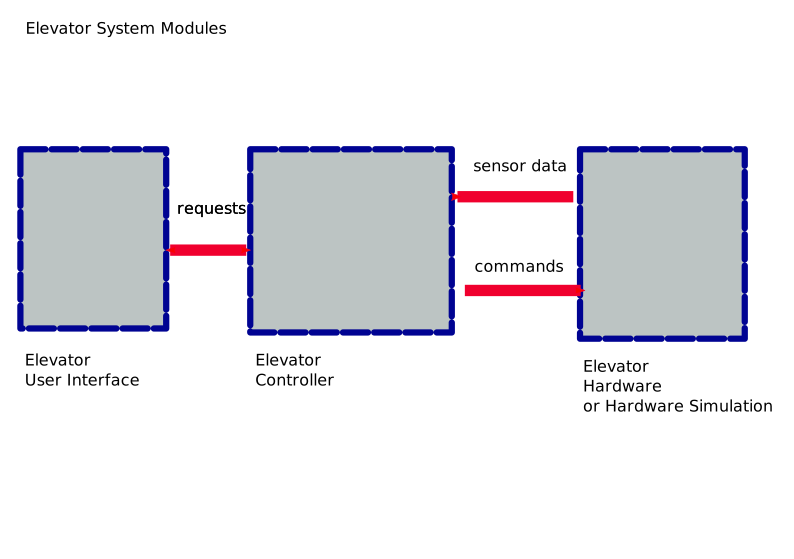
A schema of the elevator control system with its component parts.
As you can see from the above figure, command data flows from the higher levels of the system on the left to the low-level parts on the right, and sensor data flows back from the lower levels to the higher-level parts, as is typical for any kind of well-designed hardware driver.
5.4.2. Message definitions
So, how is the messaging done? To understand the hardware, it is important to realize that in terms of information interchange, it consists of sensors and actors, so we will have one message type for each. The control process will send commands to the actors, and it will receive data from the sensors.
For connecting the user interface and the control process, we chose a service interface. Because things can occasionally go wrong (think of a photoelectric door sensor which is out of order), we want to return possible error messages and the resulting position as return parameters of the service request.
So, we end up with the following message definitions:
5.4.2.1. Message definition for UI service requests
# means the requested floor number
# floor number 0 is ground floor (European numbering)
# negative numbers are basement floors

service
request
int32_t requested_floor

# reports the actual floor number we arrived at
response
int32_t arrived_floor
uint32_t error_code
char* error_message
uint32_t error_message_len

# The meaning of the error code is as follows:
#
#    NO_ERROR                     = 0  # no error happened
#    FLOOR_NUMBER_TOO_HIGH        = 1  # the floor number was too large
#    FLOOR_NUMBER_TOO_LOW         = 2  # the floor number was too small
#    OUT_OF_ORDER                 = 3  # the hardware is not working properly
#    FIRE_ALARM_OPERATION_STOPPED = 4  # Fire alarm, elevator has stopped at ground floor
Here, the requested_floor parameter is simply the floor the elevator
should come to, and the result_floor is the floor we have arrived
at. (It does not need to be the same, because we could upgrade our
transport control algorithm so that the elevator could do an
intermittent stop, or even to cancel a journey so that it can
respond to a medical emergency).
In addition, we also provide an error status code and a string error
message which is intended to help to debug the system and understand
its state in case there are any problem. As explained in section
How to create Service Message Definitions, such error
messages are variable-length arrays, which are always accompanied
by a length field, so we have a field error_message
and a field error_message_len.
The error codes and their meaning are part of an interface. Therefore, they are documented here in the comments.
5.4.2.2. Message definition for hardware actors
1# meaning of the command value:
2# UP = 1     means to move the elevator up
3# DOWN = -1  means to move the elevator down
4# STOP = 0   means to not move the elevator
5
6int32_t move_command
7
The motor_control message has a single element, which is named
move_command. Its meaning is simple: Move the elevator up by the
indicated amount of floors (and down if it is a negative number).
5.4.2.3. Message definition for hardware sensors
 1# floor number, can be fractional when moving
 2float floor_number
 3
 4# meaning of the direction value:
 5# UP = 1     means it is moving up
 6# DOWN = -1  means it is moving down
 7# STOP = 0   means it is not moving
 8
 9int8_t movement_direction
10
11int8_t smoke_detected
12
The floor_count message contains three elements: The first,
floor_number, is a single number, which is the current floor
position, which we have made a floating-point value. The second,
movement_direction is a number that indicates whether the elevator
is moving, and into which direction. A value of 1 indicates it is
moving upwards, a value of -1 tells that it is moving downwards, and a
value of 0 means it has stopped.
The third element is the field smoke_detected. It just signals the
reading of an alarm system which should stop the elevator if there is
a fire. When smoke is detected, it shall change to a non-zero
value. We will use it later to explain and demonstrate essential
concepts of error handling and exceptions, and how to send them to
client processes.
As we shall see, these three short definitions are enough to control and operate the system. (In fact, limiting interfaces to what is essentially needed, while keeping them general makes it easier to change systems, so this is a good thing!)
You see that we made the constants which are used by the control elements, as well as their meaning, a part of the message definition. This is because they are part of the interface we are defining. We need to have stable interfaces, and therefore the meaning of the values has to be fixed.
5.4.2.4. Division into processes and modules
We are now almost that far that we can divide the system into processes and write the LN manager configuration file. But to make it still a bit clearer, here is a schematic plan of our newly designed system:
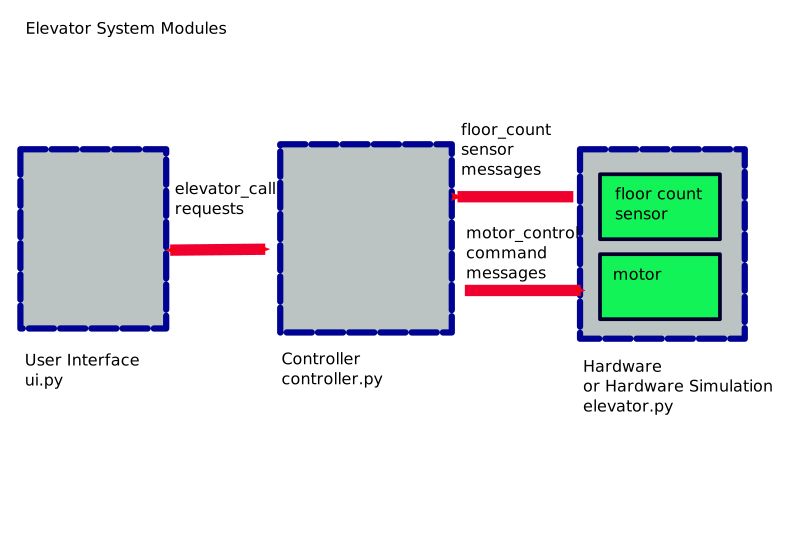
Elevator control system with component processes and message types
With this, we are ready to write the configuration for the LN Manager. We will show how to do that in either Python 3 or C++, so you can chose which language you prefer.