4.2. Topic Communication in Python
Note
The example uses Python 3. If you need to know more about which versions of Python and/or C++ are supported, see section Language Standards we use and which are supported by LN in the tutorial. Section Prerequisites gives detailes about the required installation.
This section shows a minimal example of how processes can exchange information in real-time, via topics which exchange messages via a publish/subscribe pattern. (If you want to look up what these terms mean, they are defined in the communication bullet point of the Introduction chapter).
To summarize, the main points are these:
different processes can exchange information via messages, which are compound data structures a fixed data type.
messages are associated with topics, which is basically a label for a specific stream of messages
one process can send messages, it is the publisher in respect to that topic.
other processes (one or more) can receive messages, they are subscribers.
We will show now how that works. The first thing we need to do is to define what data elements the messages we want to send will contain. This is done using a piece of text information which we call a message definition.
4.2.1. Creating Message Definitions
Message definitions are usually stored in plain text files which are part of the set-up of a distributed system.
So, to create a message definition with name
counter/count_message, we create a plain ASCII text file with this
content:
double time
uint32_t num_counts
and store this text file in quickstart/python/topics//ln_msg_defs/counter/count_message.
What does the content of the message definition mean? it means that we have two fields:
time
num_counts
and that the “time” field has the type double (which is a 64-bit floating point value), and the “num_counts” field has the type uint32_t (which is the C type name for an unsigned integer value with 32 bits).
So, we can imagine messages of this type as a packet of data which has
the same structure as a C or C++ structure, or a python dictionary, or
a python argparse.Namespace instance: Each name is mapped to a
value, and each value has a fixed type.
Except that we can use the definition in other languages such as python, that we can beam them back and forth between different processes and processes on different computers, and also that we can even share it between systems which have a different endianness, for example.
4.2.2. The Publisher Python Script
create a python script quickstart/python/topics//python/counter_publisher.py like this:
 1#!/usr/bin/env python3
 2
 3import time
 4import links_and_nodes as ln
 5
 6clnt = ln.client("counter publisher")
 7port = clnt.publish("counter1.count_message", "counter/count_message")
 8while True:
 9    time.sleep(0.1)  # or wait for an event of interrest
10
11    port.packet.time = time.time()  # fill new message packet
12    port.packet.num_counts = (port.packet.num_counts + 1) % 1024
13
14    port.write()  # send/publish
Let’s go just through a few interesting aspects of the script:
In line 2, the
links_and_nodespython module is imported asln. The short name is useful to save typing and avoid wildcard imports. We suggest to always use the nameln, to make reading code easier for other people.in line 4, an LN client is initialized. The parameter that is passed for the initialization is the name of the client, which is used by the LN Manager to display its state.
In line 5, a publisher port is initialized, using the
ln.client.publish()method. The two arguments are the names of the topic which is used (counter1.count_message), and the name of the message definition (counter/count_message).Here, the name of the topic is almost equal to the name of the message definition. However this is optional: While it is often practical and makes things simpler to keep names in sync, they can be different. The reason for this is that message definitions and topic names serve two different purposes: The topic is like the frequency of a radio broadcast, which determines which content we will get where, and under which title. (For further reading, the section on Message definitions and topics in the tutorial gives a more in-depth explanation of the relationships between message definitions, topics, and their names.)
The message definition is, in contrast, just the type of the transmitted data. This means that one can use the same message definitions in different places. For example, a message definition which defines a vector of three floating point elements could be used to signal the place of a vehicle, its speed vector, its acceleration, and perhaps also the place it should go to.
after the initialization, the program starts its main processing loop. This is interspersed with any kind of activity (like the
sleepcommand), and then generating and sending data. The latter is done in two steps:the assignment to
port.packet.timeputs data into the message buffer. The elements of the message are member values ofports.packet, and thetimefield is defined by the message definition and generated automatically when the port was initialized in line 5. In the same way, the assignment toport.packet.num_countsgenerates some data which is updated within each step. This value field does not need to be initialized in Python, because the packet values are initialized to zero.When the message data is prepared, it is sent using the
port.write()command. This function transmits the message and returns after the transmission has been initiated.
4.2.3. The Subscriber Python Script
The script quickstart/python/topics/python/counter_subscriber.py is an example
for a matching subscriber program:
1#!/usr/bin/env python3
2import links_and_nodes as ln
3
4clnt = ln.client("first subscriber")
5port = clnt.subscribe("counter1.count_message", "counter/count_message")
6while True:
7    count_packet = port.read()
8    print("time: %.1f, num_counts: %s" % (count_packet.time, count_packet.num_counts))
The initialization of the program is very similar to the initialization of the publisher, with one difference: the method
clnt.publish(...)is replaced by the methodclnt.subscribe(...). This means that this port will wait for data which was written by the publisher script.Note
This initialization is done only once. This is recommended, since the initialization of a publisher or subscriber client (or other communication channels) can be much more time-consuming than using the communication link, even if it requires only very little code.
The main loop uses the
port.read()method in order to receive data. If there is no data available, the client will block until this is the case.When the
port.read()method has completed, it returns apacketinstance, whose memberspacket.timeandpacket.num_countsare populated with the values that have been sent by the publisher.
4.2.4. Configuring the LN Manager for Message Exchange
Now, we add a minimal configuration for the LN manager that supports exchange of these messages. First, we will do that in a bare minimum way, without using the manager for process management. After that, we will add automatic process management again.
Create a ln-manager config file quickstart/python/topics/main.lnc:
1instance
2name: topic communication example for %(env USER)@%(hostname)
3manager: :%(get_port_from_string "%(instance_name)")
4
5add_message_definition_dir: %(CURDIR)/ln_msg_defs/
This creates a unique instance name and manager listening port. As in the previous quickstart example on basic process configuration <quickstart/basic_process_configuration>, it sets the instance name and the port number derived from environment variables.
In addition to that example, there is also a directive which tells the LN manager where it can find the message definition which we defined in the first step. This is necessary because the LN manager needs to start some background processing that supports message exchange, and for this it needs to know the message definitions which we are using.
The %(CURDIR) expression defines the folder in which the search
path starts, which is the folder in which the configuration file which
we are discussing is included. Because we have put the message
definition into the folder “ln_msg_defs`, we need to add it. Once the
LN manager knows this folder, it and the client programs can find the
correct message definition, as the rest of the path is defined in the
name of the message definition. (And, of course, it is possible to
use multiple folders with message definitions, so that we can compose
larger systems from smaller ones).
4.2.4.1. Running Publisher and Subscriber with manual Process Management
Start the ln_manager in one terminal:
ln_manager -c quickstart/python/topics/main.lnc
The manager will open its GUI as shown below and output a log-message similar to
listening on '<hostname>:<port>' for ln-clients!, we need the <port>.
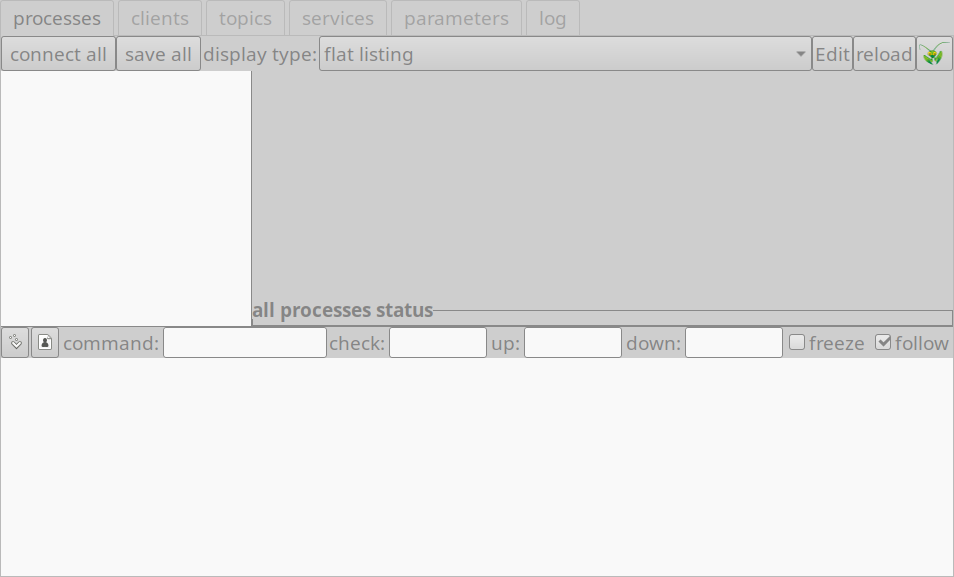
The LN manager serving a publisher and subscriber
In another terminal, start the publisher:
LN_MANAGER=localhost:<port> python3 quickstart/python/topics/python/counter_publisher.py
If all goes right, no output should be generated.
In a third terminal, now start the subscriber:
LN_MANAGER=localhost:<port> python3 quickstart/python/topics/python/counter_subscriber.py
The process should output lines like this:
time: 1647435215.4, num_counts: 5513
...
Within the ln-manager GUI, when clicking on the “topics” tab, you
should see our counter topic published with a rate of ~10Hz as
shown below:
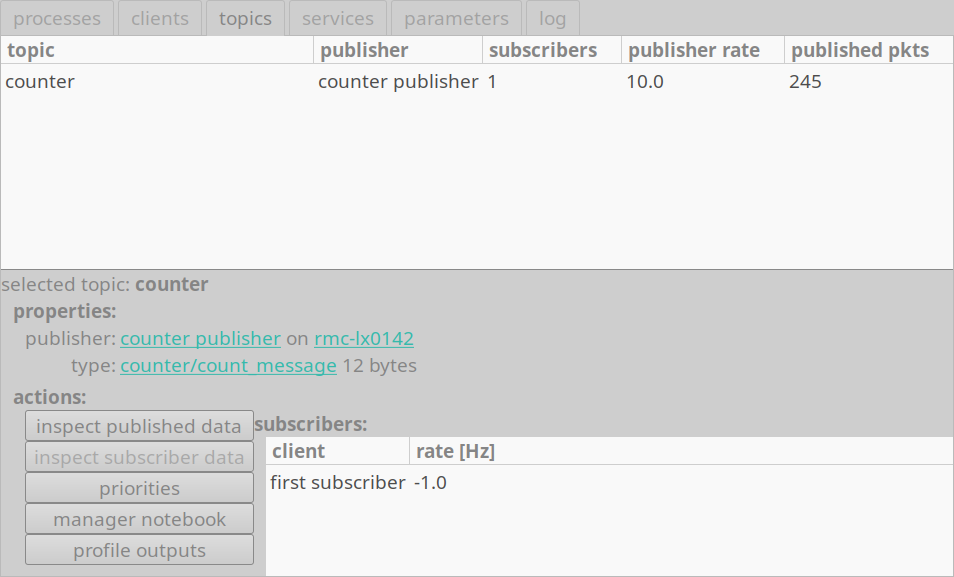
The counter topic, when selecting the “topics” tab.
This shows in the top half a list of topics. In the bottom half, after selecting the “counter” topic, it shows a list of the clients and the averaged frequency of exchanged messages.
4.2.4.2. Delegating the Process Management to the LN Manager
The example above is not very practical, because we need to start the processes with the right port number, so that they can reach the manager.
We can do this with less manual typing, and in a more comfortable way, when we use the LN manager for process management, as shown in section Process Management.
To do this, we can put those command lines in the ln-manager config file so that we don’t have to remember them:
 1instance
 2name: longer topic communication example %(env USER)@%(hostname)
 3manager: :%(get_port_from_string "%(instance_name)")
 4
 5add_message_definition_dir: %(CURDIR)/ln_msg_defs/
 6
 7process publisher
 8change_directory: %(CURDIR)
 9command: python3 python/counter_publisher.py
10pass_environment: PATH, PYTHONPATH, LD_LIBRARY_PATH
11add flags: use_execvpe
12node: localhost
13
14process subscriber
15change_directory: %(CURDIR)
16command: python3 python/counter_subscriber.py
17pass_environment: PATH, PYTHONPATH, LD_LIBRARY_PATH
18add flags: use_execvpe
19node: localhost
The example uses a few additional flags for the processes. The details are explained in the reference part in process section. To explain and highlight the flags and attributes used here:
as before, each process has a name, which is given at the start of each process section
the
change_directorydirective defines the working directory of the process. This makes it easy to start the script, whose name is a parameter with a relative path to the python command.The LN manager keeps the environment of each process as clean as possible. However, certain environment variables need to be passed, so that the python script can find module dependencies and shared libraries. These are defined with the directive
pass_environment, which tells the LN Manager to pass the environment variablesPATH, PYTHONPATH, andLD_LIBRARY_PATHto the defined process.
the directive
add flags: use execvpetells the manager to use thePATHenvironment variable to find and start the process (instructing the operating system kernel to do so), and to pass it the environment values specified via thepass_environmentdirective.as shown in the previous quickstart chapter Process Management in section Configuring processes and their dependencies, we can (and probably also should) define dependencies between processes. To keep it short, we skip over this aspect here; however if you want to know more on dependencies in this case, this aspect is discussed in section Among communicating processes, which process should depend on another?.
After starting both processes you should get something like this:
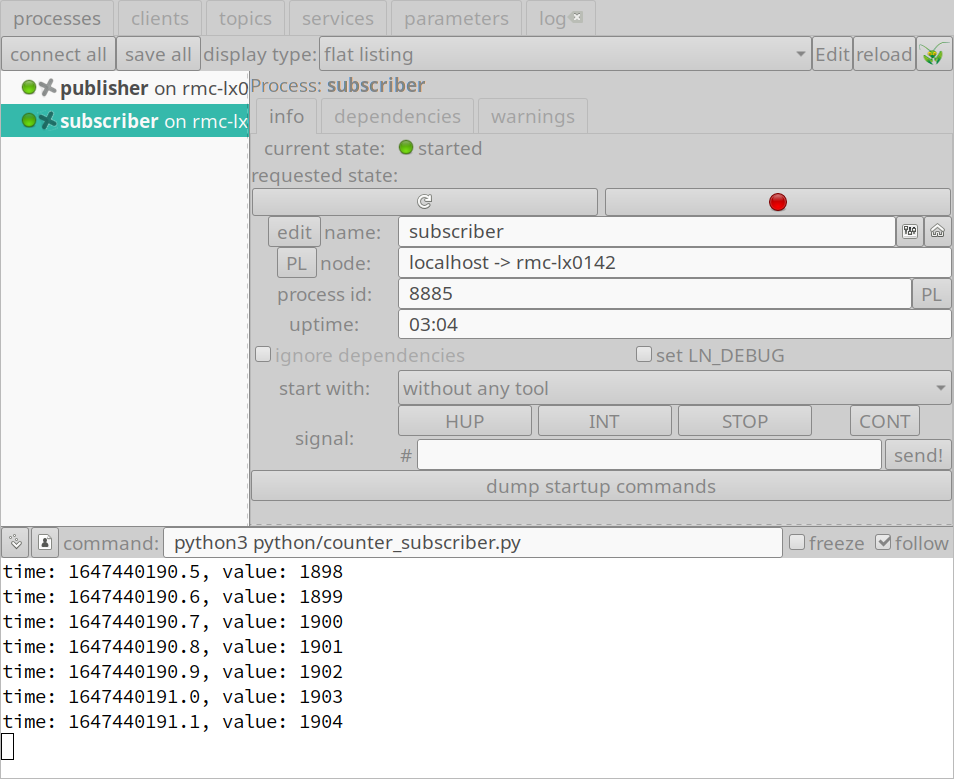
Processes communicating as publisher and subscribe which are managed by the LN Manager
A final note: We have simplified a lot to make the main points clearer. The User Guide gives a lot more information on details. One thing worth noting here is that a process can be both a subscriber and a publisher, and can of course access more than one topic.
See also
See section Some hints on how to use topics and messages for some hints on how to use message definitions effectively.